Introduction
Next.js is a powerful framework that enables you to specify how content will be rendered on a page-by-page basis; one page can be server-rendered, while another can be client-rendered. This provides incredible flexibility, but introduces some challenges when integrating with Apollo Client to retrieve data from a GraphQL server. In this post, I’ll walk through a basic example that demonstrates these challenges and presents a solution to overcome them.
Note
This blog post only applies to Next.js version 12. The latest version (13 at the time of writing) has enhancements that would change the suggested implementation. A future blog post will cover these.
Prerequisites & Initial Setup
You should have a basic knowledge of React, Next.js, and GraphQL, as well as an understanding of the difference between client-side and server-side rendering.
To get started we’ll create a project using create-next-app to scaffold a basic Next.js app with TypeScript.
npx create-next-app@latest --typescriptSetting up Apollo Server
We’re going to setup an extremely primitive GraphQL server using the Apollo Server package. Run the following command to install the required dependencies:
npm i @apollo/server graphql @as-integrations/next- The
@apollo/serverpackage is relatively new and replaces the now deprecatedapollo-server-micropackage (EOL October 2023). For more details on the changes, see this blog post introducing Apollo Server 4 @as-integrations/nextis a new (as of November 2022) package that provides a prebuilt integration between GraphQL Server and Next.js.
Now that we have the required dependencies installed, create a new file, server/resolvers/index.ts, that will serve as our resolver. To keep the app simple, we’re going to mock the data and return it as-is.
const books = [
  {
    id: 1,
    title: "Mistborn",
    author: "Brandon Sanderson",
  },
  {
    id: 2,
    title: "Leviathan Wakes",
    author: "James S. A. Corey",
  },
  {
    id: 3,
    title: "Red Rising",
    author: "Pierce Brown",
  },
];

export const resolvers = {
  Query: {
    books: () => books,
  },
};
With our resolver defined, we can create a Next.js API route that instantiates an Apollo server and enables clients to access data.
pages/api/graphql.ts
import { ApolloServer } from "@apollo/server";
import { startServerAndCreateNextHandler } from "@as-integrations/next";
import { resolvers } from "../../server/resolvers";

const typeDefs = `#graphql
  type Book {
    id: String
    title: String
    author: String
  }

  type Query {
    books: [Book]
  }
`;

const apolloServer = new ApolloServer({ typeDefs, resolvers });

export default startServerAndCreateNextHandler(apolloServer);- Lines 5-15: Define a GraphQL schema containing a single
Booktype and abooksquery that will retrieve all books - Line 17: Instantiate a new
ApolloServerusing the GraphQL schema and the resolvers - Line 19: Pass the server instance into
startServerAndCreateNextHandler; this is a helper function that starts the Apollo server and creates aNextApiHandler, which is the required export type from an API route.
Testing the Server
- Spin up the app by running
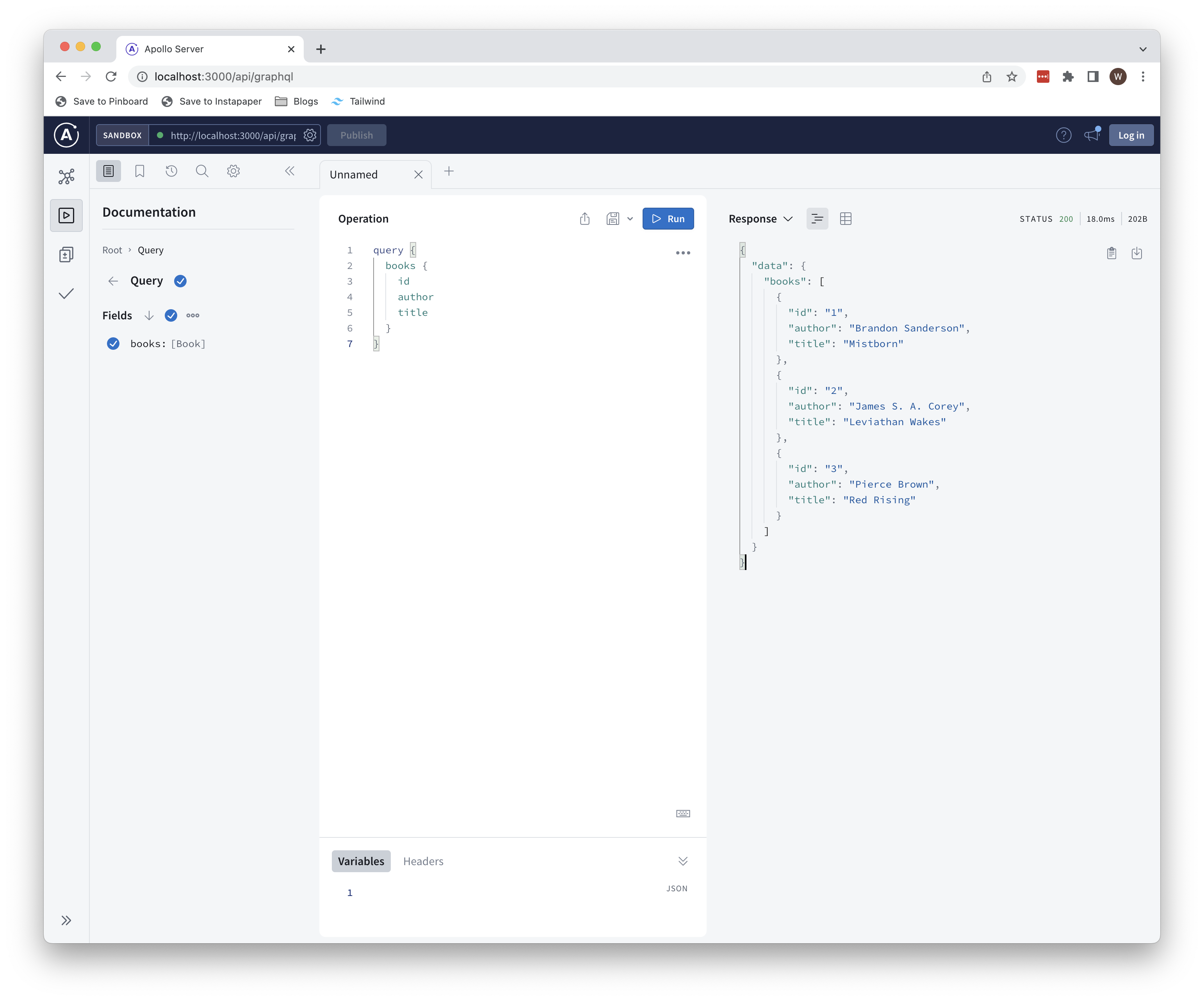
npm run devand navigate tolocalhost:3000/api/graphql - You should see the Apollo Server sandbox. Run the following query and verify that the expected data is returned:
query {
  books {
    id
    author
    title
  }
}
Setting Up Apollo Client: Naive Approach
In a typical client-rendered React application, Apollo Client is used to query GraphQL data from the browser, then use that data when rendering a component. Next.js blurs the lines between client and server, so it’s often difficult to fully comprehend what is happening where and when.
Let’s start with a naive implementation that at minimum gets the app working, then we’ll explore how to optimize performance and reduce redundancy. First, install the @apollo/client package:
npm i @apollo/client
Next, we’ll add a function that initializes an Apollo Client instance. Create a new file under lib/getApolloClient.ts:
import {
  ApolloClient,
  InMemoryCache,
  NormalizedCacheObject,
} from "@apollo/client";

let client: ApolloClient<NormalizedCacheObject>;

export const getApolloClient = (forceNew?: boolean) => {
  if (!client || forceNew) {
    client = new ApolloClient({
      uri: "http://localhost:3000/api/graphql",
      cache: new InMemoryCache(),
    });
  }

  return client;
};
Create a file under the pages directory called books.tsx. The contents of the file should be as follows:
import { gql } from "@apollo/client";
import { InferGetServerSidePropsType } from "next";
import { getApolloClient } from "../lib/getApolloClient";

export const ALL_BOOKS_QUERY = gql`
  query {
    books {
      id
      author
      title
    }
  }
`;

const Books = (
  props: InferGetServerSidePropsType<typeof getServerSideProps>
) => {
  return (
    <ul>
      {props.books.map((b) => {
        return <li key={b.title}>{b.title}</li>;
      })}
    </ul>
  );
};

export async function getServerSideProps() {
  const apolloClient = getApolloClient(true);

  const { data } = await apolloClient.query({
    query: ALL_BOOKS_QUERY,
  });

  return {
    props: {
      books: data.books,
    },
  };
}

export default Books;
This is a basic Next.js page that will be server-rendered (because we’ve defined a getServerSideProps function); this means that we’ll retrieve the GraphQL data on the server, and the page will be pre-rendered with the data before it’s sent to the client. We can confirm this by running the app and navigating to http://localhost:3000/books . Open the Network tab in your browser dev tools and click on the books request (it should be the first one).
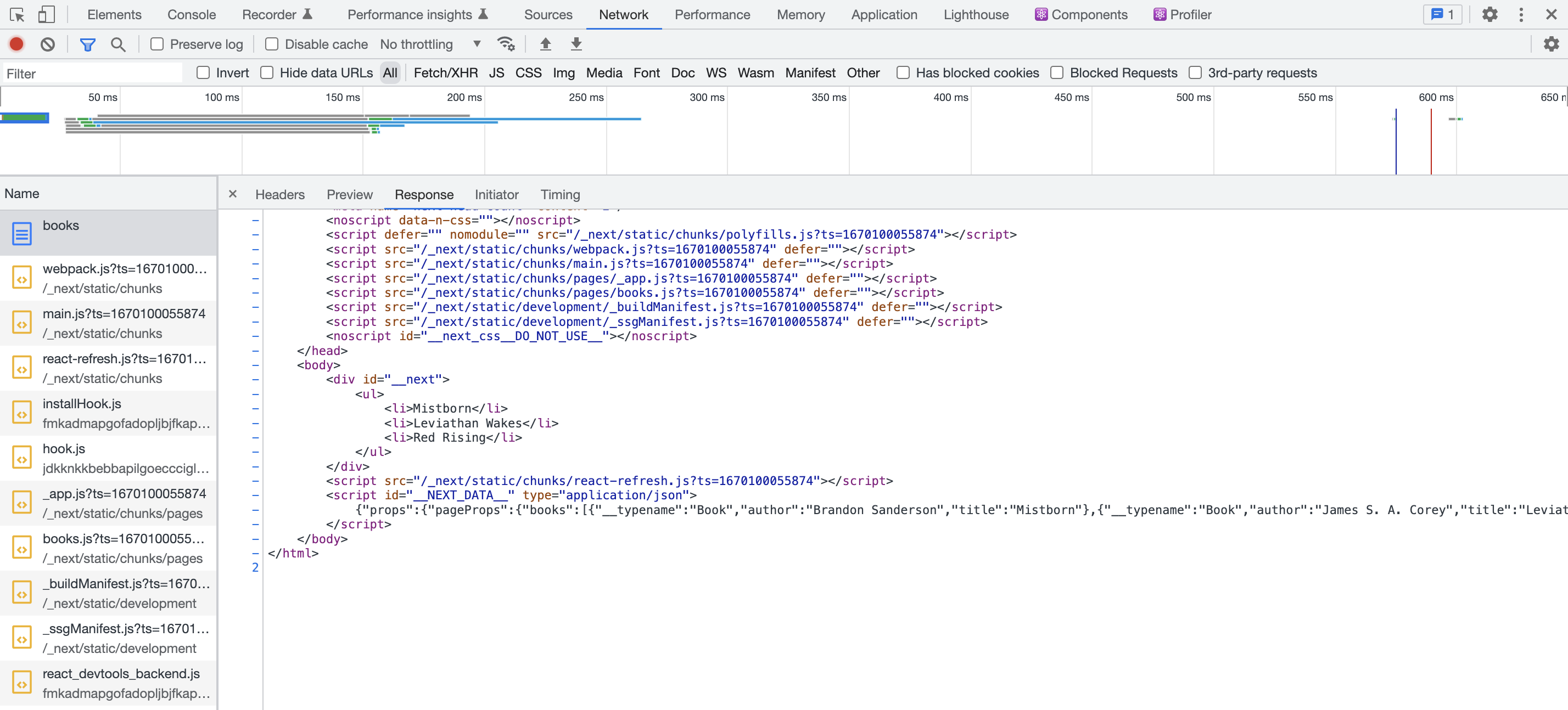
Look at the body section of the page’s HTML and observe that the list of books is already included. Additionally, you’ll notice that there are no GraphQL network requests. We’d see the same results had we used getStaticProps, but the page would be generated at build time instead of when the request was made, so it would ostebsibly load faster.
Had this page been using CSR, there would be two core differences:
- The initial HTML returned by the server would not include the list of books.
- We’d see a GraphQL network request to retrieve the books.
Let’s add a client-rendered page to our example to demonstrate. Create a new file called [id].tsx under pages/book:
import { useRouter } from "next/router";
import { gql, useQuery } from "@apollo/client";
import Link from "next/link";

export const ALL_BOOKS_QUERY = gql`
  query {
    books {
      id
      author
      title
    }
  }
`;

const Book = () => {
  const router = useRouter();
  const { id } = router.query;
  const { data, loading } = useQuery(ALL_BOOKS_QUERY, {
    fetchPolicy: "cache-first",
  });

  if (loading) {
    return <p>Loading...</p>;
  }

  const book = data.books.find((b) => b.id === id);

  return (
    <div>
      <div>
        Book: {id}: {book.title} - {book.author}
      </div>
      <Link href={`/books`}>Back</Link>
    </div>
  );
};

export default Book;
Next, we need to setup our Apollo Client instance on the client (right now, it’s just being used in getServerSideProps, which will run on the server as mentioned previously). Open _app.tsx and update it as follows:
import type { AppProps } from "next/app";
import { getApolloClient } from "../lib/getApolloClient";
import { ApolloProvider } from "@apollo/client";

export default function App({ Component, pageProps }: AppProps) {
  const client = getApolloClient();

  return (
    <ApolloProvider client={client}>
      <Component {...pageProps} />
    </ApolloProvider>
  );
}
Here, we’re just instantiating an Apollo Client and providing it to the rest of our application. This enables us to call the useQuery hook (line 18 of book/[id].tsx) to retrieve data client-side.
Back in books.tsx, let’s replace line 21 with the following to create a link to our new page (don’t forget to include the next/link import):
return (
  <li key={b.id}>
    <Link href={`book/${b.id}`}>{b.title}</Link>
  </li>
);
To break things down, we have a page that lists out all books, and a dynamic page that will show details for a selected book. If we select a book from the main page, we’ll be routed to the page with details for that book where a GraphQL query will be executed to retrieve the book’s details. Here are the steps describing where things are rendered:
- Visit
books- this page is server-rendered, so the GraphQL query will be executed on the server and our page will be pre-rendered with data. - Click on a book to navigate to the details page. This page is client-rendered, so the GraphQL query will be executed on the client (i.e. from the browser).
This approach certainly works, but there are some limitations that make it undesirable. Mainly, we have to query for the same data twice; once on the server and once on the client. In an ideal scenario, we’d be able to leverage the Apollo Client cache (described shortly) so that data retrieved from the server doesn’t need to be retrieved again.
To demonstrate this, start up the app and open the network tab in your browser’s dev tools. You’ll see the same results as before when visiting /books; the page is server-rendered, so the GraphQL query executes on the server and pre-populates the page with data. You can confirm that the Apollo cache is empty at this point by inspecting it using the Apollo browser extension. Select a book from the list and observe in the network tab that a GraphQL request is made to retrieve the books from the server. If you inspect the Apollo cache again, you’ll notice that it’s now populated with the books retrieved from the backend.
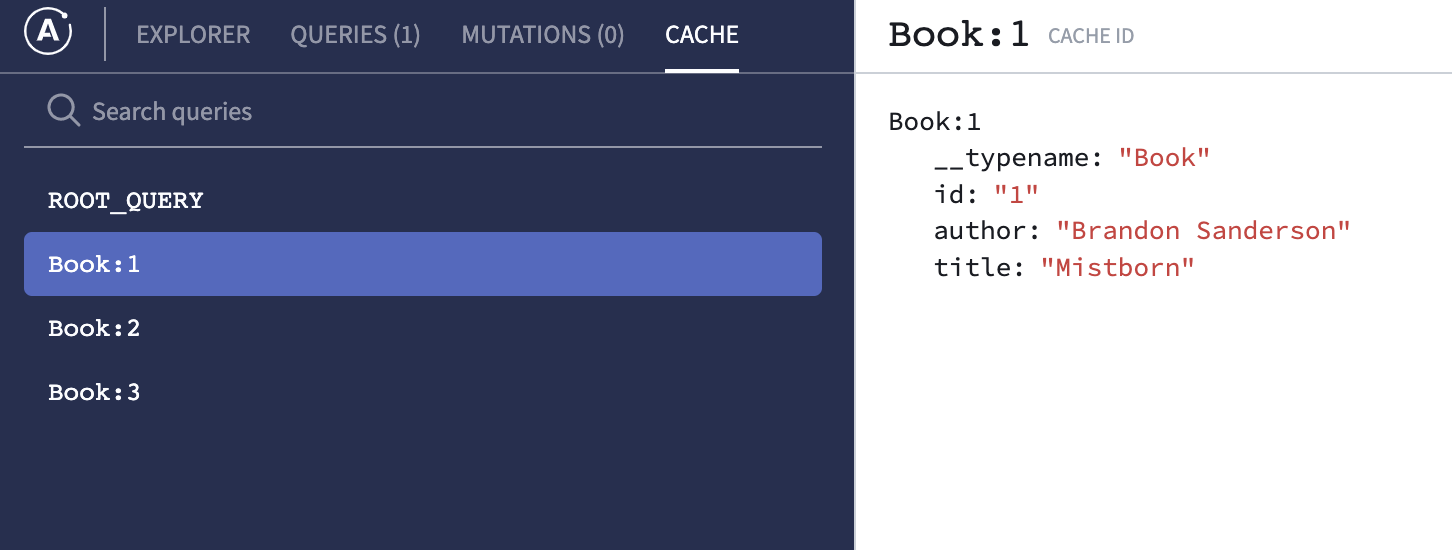
With a small volume of data, the performance implications are negligible, but as data volumes increase we’ll want to take advantage of caching as much as possible to avoid potentially expensive network requests. It would be great if we could pre-populate the client cache with the data that’s retrieved when server-rendering the /books page (and we’ll see exactly how to do that shortly).
One final concern with the current approach, and Next.js in general, is that server-side queries must be executed from a page. Suppose that we want to execute a query from a page’s child component instead of the page itself. getServerSideProps only works at the page level, so we need to figure out how to run the component’s query on the server.
Before diving into the solution, let’s review a few key concepts related to both Next.js and Apollo that are used as foundational building blocks for a comprehensive SSR implementation.
Apollo Client Cache
Arguably the most critical feature of Apollo Client is its caching mechanism, which is conceptually simple but quite complex under the hood. When we query data from a GraphQL server for the first time, it will be stored in a cache. Subsequent queries for the same data will retrieve that data from the cache, avoiding an unnecessary network request. The Apollo documentation has a great in-depth overview of the cache, so I highly recommend checking that out to get a more detailed walkthrough.
For our purposes, we’ll leverage the cache so that client-side queries don’t need to make another network request for data that was already retrieved when server rendering.
Apollo Client getDataFromTree
This is a slightly more advanced topic, but it underlies the core foundation upon which our implementation will be built. Apollo client provides a function called getDataFromTree that accepts a React tree as an argument, parses the tree to determine which queries need to be run, then runs those queries. For example, suppose we have a basic component hierarchy like this:
const App = () => {
  return <ParentComponent />;
};

const ParentComponent = () => {
  // useQuery call here
  return <ChildComponent />;
};

const ChildComponent = () => {
  // useQuery call here
  return <div>Child</div>;
};
When this tree is passed into getDataFromTree, two queries will be extracted and executed; one from ParentComponent and one from ChildComponent. The data from the executed queries will be added to the Apollo client cache.
Next.js Custom Document
In Next.js, a custom Document can be created to override default page rendering behavior. This page effectively serves as a wrapper around the app that will be rendered on the server, and it has a getInitialProps function that is invoked on the first render of the app. We can override the getInitialProps function and inject custom logic that we want to run when the page is being rendered on the server.
getInitialProps is a static function that accepts a DocumentContext argument, which contains various properties related to the page being rendered. Importantly, it includes an AppTree property that represents the component tree that will be rendered. This is where we’re going to use the Apollo client’s getDataFromTree function to execute the component tree’s queries and initialize the client cache.
Implementation
Credit for this implementation goes to Stephen Shaw, who provides a great overview in this video. I’ve made some very minor tweaks and updated it to play nicely with TypeScript.
Apollo Client Initialization
First, we need to update the function that initializes an ApolloClient instance in getApolloClient.ts.
import {
  ApolloClient,
  InMemoryCache,
  NormalizedCacheObject,
} from "@apollo/client";

const isServer = typeof window === "undefined";
const windowApolloState = !isServer && window.__NEXT_DATA__.apolloState;

let CLIENT: ApolloClient<NormalizedCacheObject>;

export function getApolloClient(forceNew?: boolean) {
  if (!CLIENT || forceNew) {
    CLIENT = new ApolloClient({
      ssrMode: isServer,
      uri: "http://localhost:3000/api/graphql",
      cache: new InMemoryCache().restore(windowApolloState || {}),
    });
  }

  return CLIENT;
}
We create a shared ApolloClient instance called CLIENT that can be reused. If the client hasn’t been initialized (or if we’re forcing a new initialization), then we’ll create a new instance with the following properties:
ssrMode- If the client is being used on the server, this will be set totrueuri- The GraphQL server URI (same as before)cache- AnInMemoryCacheinstance that is restored from the cache state that exists on the globalwindow.__NEXT_DATA__object. If no cached state exists, an empty cache will be created.
_app Updates
Next, we’re going to update _app.tsx as follows:
import type { AppProps } from "next/app";
import { getApolloClient } from "../lib/getApolloClient";
import { ApolloProvider } from "@apollo/client";

export type CustomPageProps = {
  __APOLLO_STATE__: Partial<unknown>;
} & Record<string, any>;

export default function App({
  Component,
  pageProps,
}: AppProps<CustomPageProps>) {
  const client = getApolloClient(false);

  return (
    <ApolloProvider client={client}>
      <Component {...pageProps} />
    </ApolloProvider>
  );
}
We’ve created a CustomPageProps type to override the default Next.js page props type. Our custom type includes an __APOLLO_STATE__ property that will hold our Apollo cache state (more details on this shortly).
Custom Document
This is the lynchpin of our solution. Add a new file called _document.tsx in the pages directory.
import Document, { DocumentContext, DocumentInitialProps } from "next/document";
import { getDataFromTree } from "@apollo/client/react/ssr";
import { getApolloClient } from "../lib/getApolloClient";
import { NormalizedCacheObject } from "@apollo/client";

type DocumentInitialPropsWithApollo = DocumentInitialProps & {
  apolloState: NormalizedCacheObject;
};

// Reference: https://github.com/shshaw/next-apollo-ssr
class DocumentWithApollo extends Document {
  constructor(props) {
    super(props);

    const { __NEXT_DATA__, apolloState } = props;
    __NEXT_DATA__.apolloState = apolloState;
  }

  static async getInitialProps(
    ctx: DocumentContext
  ): Promise<DocumentInitialPropsWithApollo> {
    const apolloClient = getApolloClient(true);
    await getDataFromTree(<ctx.AppTree {...ctx.appProps} />);
    const apolloState = apolloClient.extract();
    const initialProps = await Document.getInitialProps(ctx);

    return { ...initialProps, apolloState };
  }
}

export default DocumentWithApollo;
We’re creating a new class, DocumentWithApollo that extends the Document class and overrides the getInitialProps function. Recall from earlier that this function is invoked whenever we load a page, and it’s rendered on the server. We’ll walk through the updated version of this function line by line:
- Line 22: Get an
ApolloClientinstance by callinggetApolloClient. We want to ensure that a brand new instance is returned, so we passtrueto theforceNewargument. At this point, the cache is empty. - Line 23: Call the Apollo
getDataFromTreefunction, passing in the page’s component tree as an argument. This action will prefill the Apollo client’s cache. - Line 24: Extract the state from the Apollo client cache.
- Line 25: Get the initial props from the context.
- Line 27: Return the the extracted cache data and the initial props. This is the critical step that prevents clients from needing to refetch data from the server.
As for the constructor, we’ve overridden it so that we can attach the Apollo cache state to the global __NEXT_DATA__ object, which means it’ll be accessible to the client via the window object. It’s important to understand that the constructor will be called after getInitialProps; the return value of getInitialProps is what’s passed as an argument to the constructor, which is how we’re passing the Apollo cache state so that it’s ultimately accessible by the client.
Revisiting our Page
Now that we’ve got the core functionality built out, we can go back and revise pages/books.tsx.
import { gql, useQuery } from "@apollo/client";
import { NextPage } from "next";
import Link from "next/link";
import { CustomPageProps } from "./_app";

export const ALL_BOOKS_QUERY = gql`
  query {
    books {
      id
      author
      title
    }
  }
`;

const Books: NextPage<CustomPageProps> = (props) => {
  const { data } = useQuery(ALL_BOOKS_QUERY);

  return (
    <div>
      {data?.books.map((b) => {
        return (
          <li key={b.id}>
            <Link href={`book/${b.id}`}>{b.title}</Link>
          </li>
        );
      })}
    </div>
  );
};

export default Books;
The main change is that we removed the getServerSideProps function call and are now retrieving data with Apollo’s useQuery hook directly in the component. Navigate to http://localhost/books and open the Network tab of your browser developer tools. Refresh the page and you’ll notice that the page is still being rendered on the server! The useQuery hook typically indicates that we’re rendering a page on the client, but we’ve modified this behavior through the use of the getDataFromTree function. You can confirm that the client cache is being populated by inspecting it in the Apollo section of the Chrome dev tools (assuming you’ve installed the Apollo extenstion). Now, if you select a book and inspect the network requests, you’ll see that no GraphQL requests are made; this is because we can retrieve the data from the cache.
Given how we’ve configured our app, all instances of useQuery will result in server-side rendering. To override this, we can simply modify the first line of our component:
const { data } = useQuery(ALL_BOOKS_QUERY, { ssr: false });- Note - doing this will prevent the query from executing in the
getDataFromTreefunction call made in_document.tsx.
If you do this and refresh the page, you’ll observe that the page no longer has our data pre-rendered. Additionally, you’ll see a request to the GraphQL server.
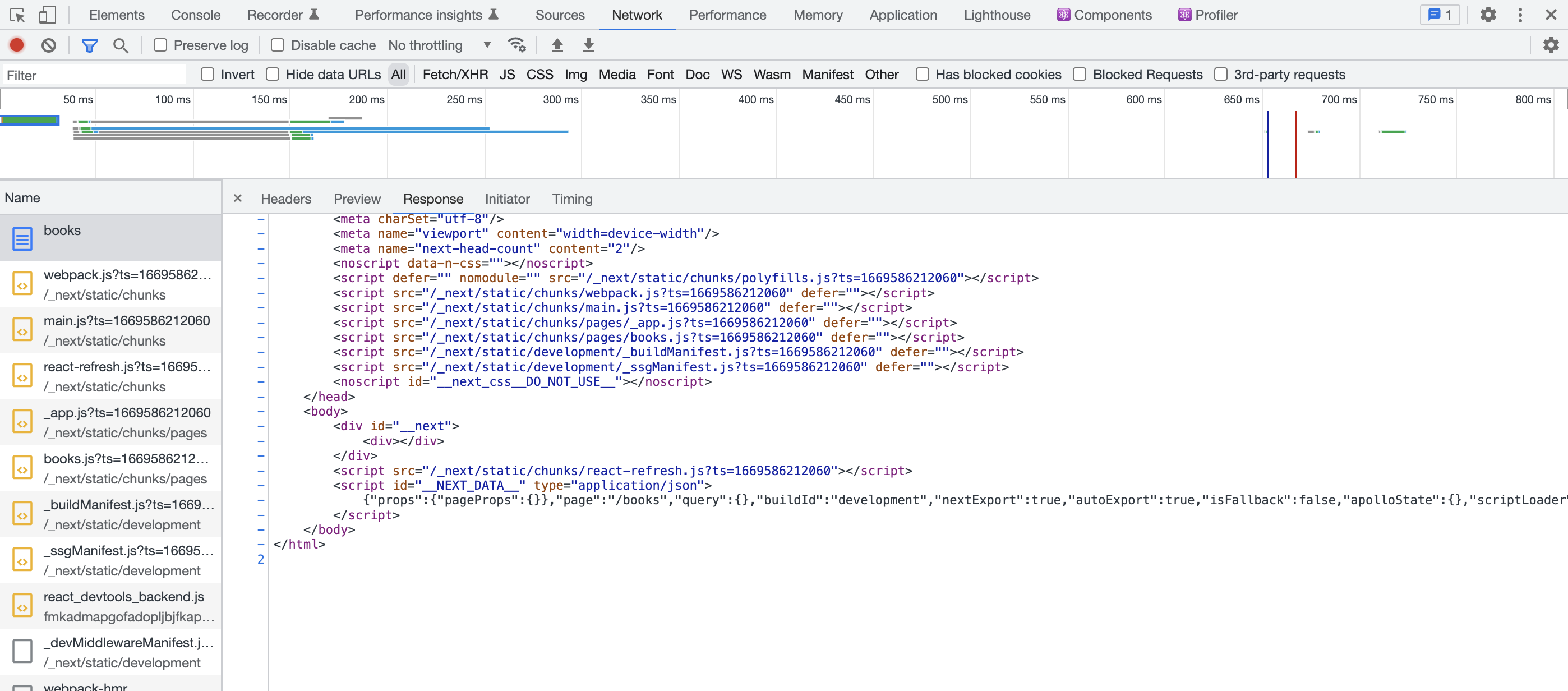
This provides a lightweight “escape hatch” if we need to use CSR in certain places.
Summary
In this post, we’ve explored a way to take full advantage of the Apollo client cache in a hybrid SSR/CSR application. The approach is admittedly not the most ideal as it involves some moderately complex workarounds, but I’ve yet to find a better way to do it. Next.js and Apollo are evolving rapidly and constantly shipping new features, so I’m optimistic that we’ll see some improvements in this integration in the near future. It’s also worth considering whether GraphQL is the best fit for a Next.js app (which we’ll explore in a future post 🙂).