Intro
I recently read this great post on some of the the pitfalls of memoization in React from TkTodo (who co-maintains TanStack Query). In one section, he proposes a solution to a poorly performing application whereby a global state manager is used instead of memoizing some slow components.
In this post, I’m going to dive a bit deeper into this proposed solution and provide an implementation using the zustand state management package.
Project Overview
In the original post, a scenario is described where a page displays several large tables, and a change to one table triggers a re-render of all other tables. This can be generalized to any component hierarchy that has one or more “expensive” components, and a change to one component causes a re-render of all components. We’ll define an expensive component as one that takes longer than average to render due to complex calculations, large amounts of data, or other reasons.
Here’s a preview of our simplified example. We have a status bar with buttons that increment a set of values, and card that displays each value.
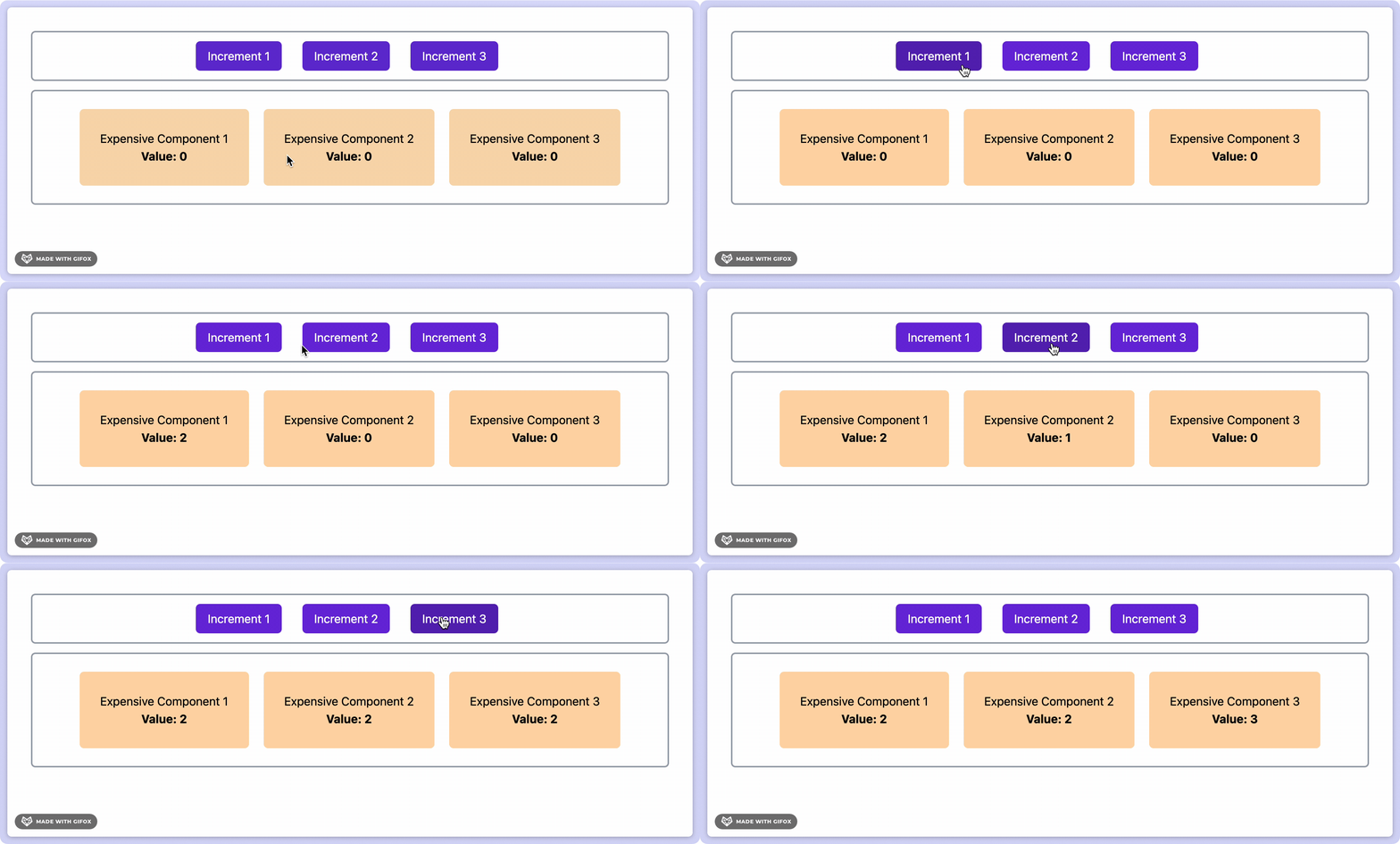
While the value card components are basic presentational components that don’t do anything complex, we’ll pretend that they are expensive to render in order to illustrate the point.
Version 1: React State
Before implementing a version of this app with a global state manager, we’ll start off with a basic version that uses React’s built-in state management.
We’ll start off by creating an ExpensiveComponent component that accepts some data and renders a card with the data. We’ll add a log statement to the component to see when it renders.
Note
Styling has been omitted from the example code for brevity.
function ExpensiveComponent({ id, data }: { id: string; data: number }) {
  console.log("render:", id);

  return (
    <div>
      <div>{id}</div>
      <div className="font-bold">Value: {data}</div>
    </div>
  );
}
Next, we’ll create a ControlPanel component, which is a row of buttons that increment the values.
function ControlPanel({ increment }: { increment: (id: string) => void }) {
  return (
    <div>
      <button onClick={() => increment("component1")}>Increment 1</button>

      <button onClick={() => increment("component2")}>Increment 2</button>

      <button onClick={() => increment("component3")}>Increment 3</button>
    </div>
  );
}
Finally, we’ll create our parent component that renders the ControlPanel and three ExpensiveComponent components.
function App() {
  const [component1Count, setComponent1Count] = useState(0);
  const [component2Count, setComponent2Count] = useState(0);
  const [component3Count, setComponent3Count] = useState(0);

  const updateComponentData = (componentId: string) => {
    switch (componentId) {
      case "component1":
        setComponent1Count((prev: number) => prev + 1);
        break;
      case "component2":
        setComponent2Count((prev: number) => prev + 1);
        break;
      case "component3":
        setComponent3Count((prev: number) => prev + 1);
        break;
    }
  };

  return (
    <div>
      <ControlPanel increment={updateComponentData} />
      <ExpensiveComponent id="component1" data={component1Count} />
      <ExpensiveComponent id="component2" data={component2Count} />
      <ExpensiveComponent id="component3" data={component3Count} />
    </div>
  );
}
Here, we’re storing the data in React state and passing it down as a prop to each ExpensiveComponent. The updateComponentData function increments the value corresponding to the component ID.
Let’s run this example and take a look at the console output when we click the increment buttons.
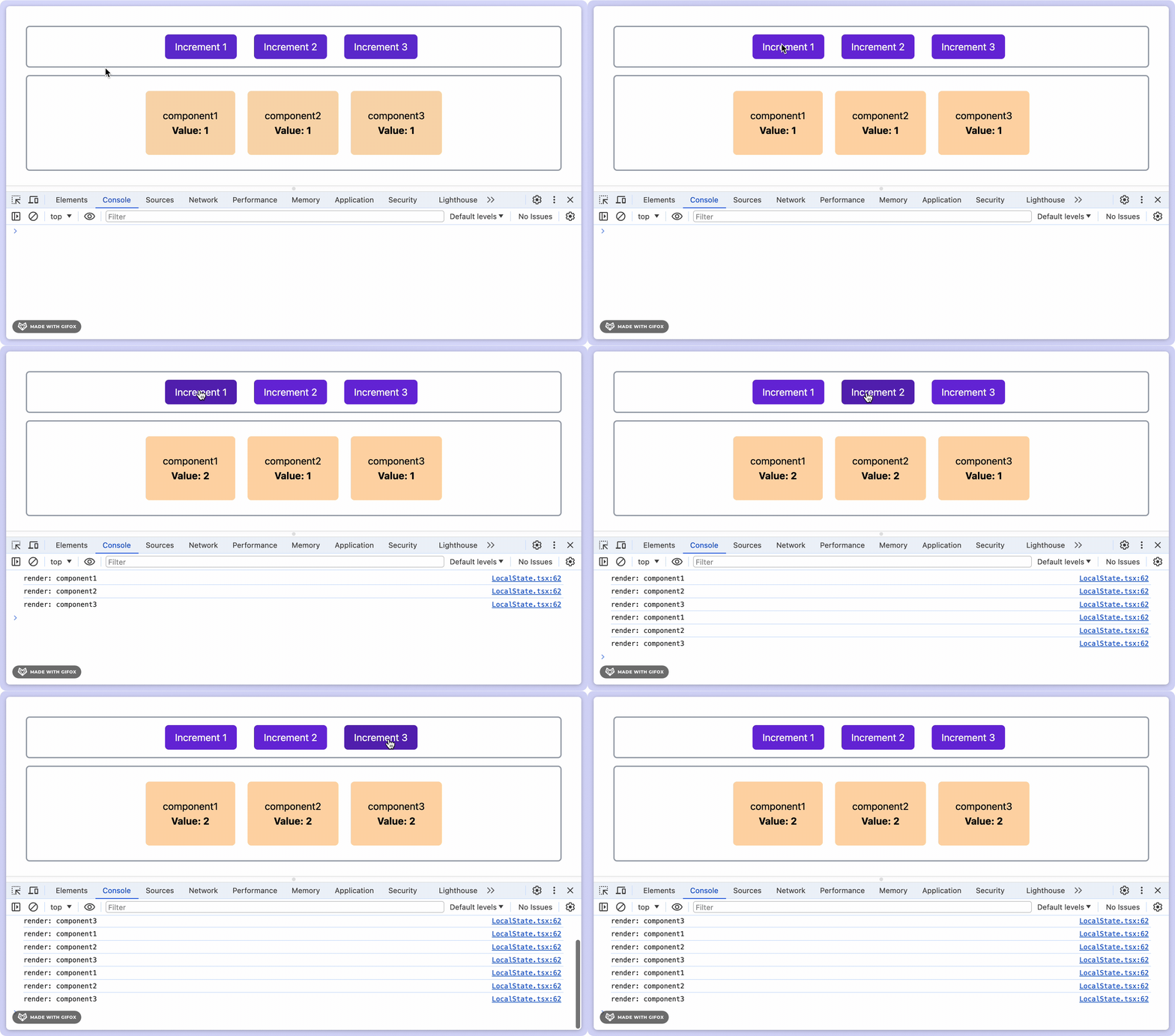
As you can see, clicking any of the increment buttons causes all three ExpensiveComponent components to re-render. This is because the state is stored in the parent component, and when the state changes, the parent component re-renders, causing all of its children to re-render as well.
At this point, we could certainly use React.memo to memoize our ExpensiveComponent instances, but we’ll instead see how a global state store can help solve this problem.
Version 2: Global State Store
There are several popular state management packages to choose from, but we’re going to use zustand in this post because it’s lightweight and easy to set up.
To get started, we’ll create a new store.ts file as follows:
import { create } from "zustand";

type TState = {
  component1: number;
  component2: number;
  component3: number;
  increment: (id: string) => void;
};

export const useStore = create<TState>((set) => ({
  component1: 0,
  component2: 0,
  component3: 0,
  increment: (id: string) => {
    set((state) => {
      if (id === "component1") return { component1: state.component1 + 1 };
      if (id === "component2") return { component2: state.component2 + 1 };
      if (id === "component3") return { component3: state.component3 + 1 };

      // Fallback to the current state
      return state;
    });
  },
}));
Our zustand state consists of four properties; three values for each of our ExpensiveComponent instances, and an increment function that is used to update the store.
Next, we’ll update ExpensiveComponent to subscribe to its corresponding value in the store.
function ExpensiveComponent({ id }: { id: string }) {
  const data = useStore((state) => {
    if (id === "component1") return state.component1;
    if (id === "component2") return state.component2;
    if (id === "component3") return state.component3;
  });

  console.log("render:", id);

  return (
    <div>
      <div>{id}</div>
      <div>Value: {data}</div>
    </div>
  );
}
Two main changes were made; first, we removed the data prop; the data will not be provided by the parent component and will instead be retrieved directly from the store. Second, we added a call to useStore to retrieve the data from the store based on the component ID.
The ControlPanel component will remain exactly the same, but we’ll make a few changes to the parent component. We’ll remove the React state and call useStore to get the increment function from our global state. The increment function replaces the updateComponentData function from the previous version.
function App() {
  const increment = useStore((state) => state.increment);

  return (
    <div>
      <ControlPanel increment={increment} />
      <div>
        <ExpensiveComponent id="component1" />
        <ExpensiveComponent id="component2" />
        <ExpensiveComponent id="component3" />
      </div>
    </div>
  );
}
Let’s run the updated example and see what happens.
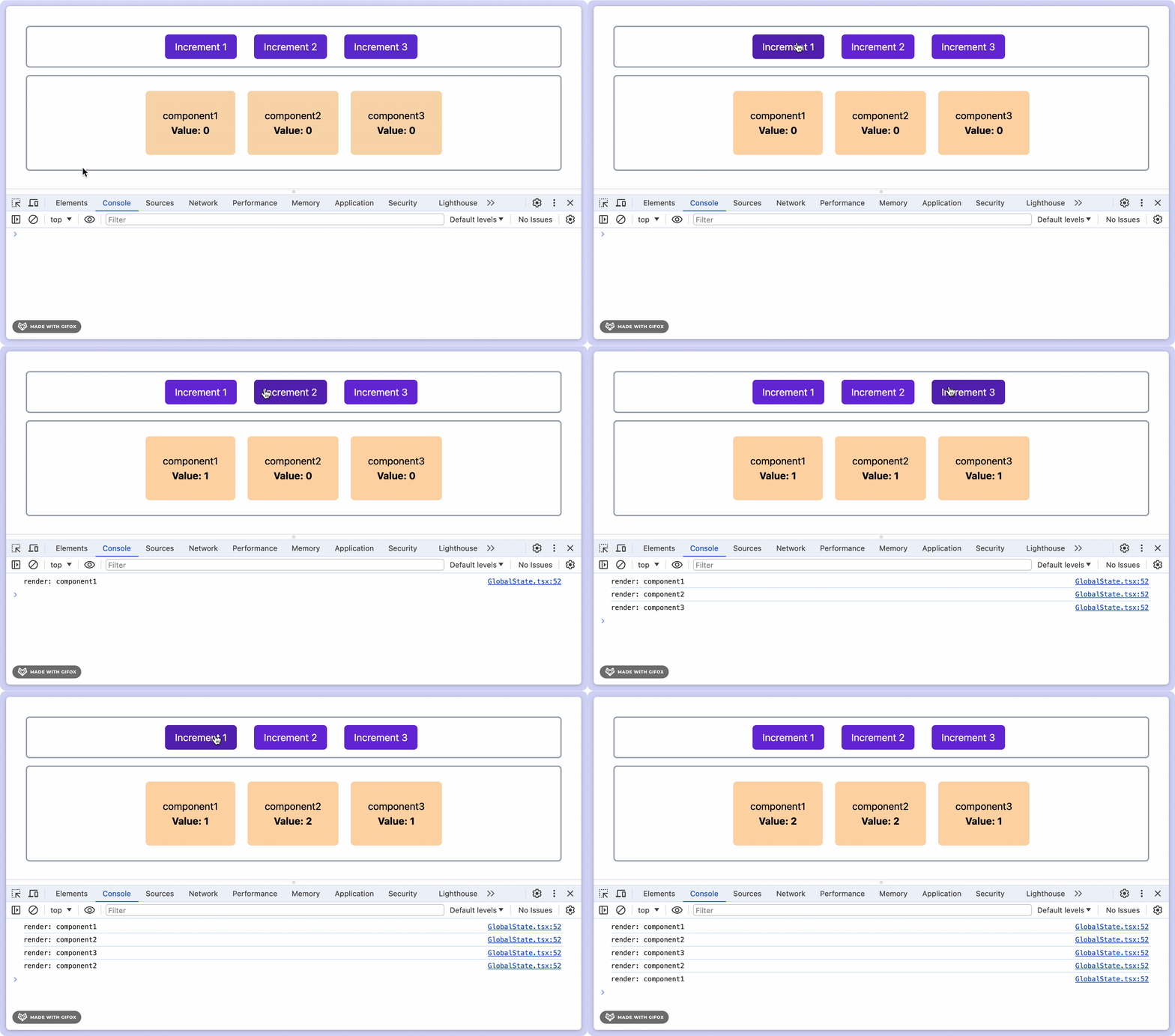
As you can see, the only components being re-rendered are the ones that have had their values updated.
Summary
Performance optimization in React is a tricky subject. Generally speaking, re-renders are fairly cheap, and prematurely optimizing performance can introduce greater complexity and more overhead than not optimizing at all.
However, there are definitely cases where re-renders can be expensive. As described in TkDodo’s post, using built-in optimization techniques like React.memo can spiral out of control pretty quickly, so a lightweight state management package like zustand can be a reasonable alternative.