One of my favorite characteristics of JavaScript is it’s support for functional programming. This is likely because of how much time I spent writing Scala in a previous life, where the functional paradigm is a first-class citizen. The elegance of functional programming resonates with me on a deep level. I much prefer this:
const names = people.map((person) => `${person.firstName} ${person.lastName}`);To this:
const names = [];

for (let person of people) {
  names.push(`${person.firstName} ${person.lastName}`);
}
Sure, the differences in that example might seem trivial, but the declaritive nature of the functional approach feels cleaner, more readable, and less error-prone than the imperative approach.
map is likely the JavaScript function I use most frequently. After all, so much of programming is data manipulation, so this shouldn’t come as too much of a surprise. However, map does have some shortcomings. A function that I see less commonly used (but that I myself use quite frequently) and that I find to be just as powerful, if not more so, is reduce.
A Basic reduce Example
I like to think of reduce as a more powerful version of map; it can do everything map can do, and then some. At first glance it can appear somewhat intimidating, but once you understand the basic mechanics it will become one of your favorite functional tools in your arsenal.
reduce is a method on the Array object that applies a function to each element in an array. In this respect, it’s exactly like map. What it does differently is that it maintains an accumulator value that’s passed as an input to each successive invocation of the user-supplied function. The accumulator is updated in some arbitrary way as each array value is processed and returned by the function once all items have been processed.
The function you supply to reduce has a two requirements:
- It must accept two arguments: an accumulator and a value whose type matches the type of the elements in the array being reduced.
- It must return a value whose type matches the type of the accumulator value.
To make that a bit more clear, let’s refactor the previous example to use reduce instead of map.
const people = [
  { firstName: "Buster", lastName: "Bluth" },
  { firstName: "Lucille", lastName: "Bluth" },
  { firstName: "Oscar", lastName: "Bluth" },
];

const addName = (names: string[], person: Person) => {
  const name = `${person.firstName} ${person.lastName}`;
  const updatedNames = [...names, name];
  return updatedNames;
};

const initialValue: string[] = [];

// ['Buster Bluth', 'Lucille Bluth', 'Oscar Bluth']
const peopleNames = people.reduce(addName, initialValue);
This example is more verbose than it needs to be, but it’s helpful to break it up like this to understand what’s happening.
First, we’ve declared a function called addName. This is our reducer function. It accepts two arguments:
- An array of strings that contains names.
- A person object.
The body of the function is simple; it creates a name by concatenating the person’s first and last name, then it appends that name to the names array. Finally, it returns the updated array.
Next, we declare an initial value for the accumulator, which is an empty array of strings.
Finally, we put everything together by calling reduce on the people array, passing in the addName function as our reducer and the initialValue variable as the initial value of the accumulator.
A more concise version can be written as follows:
const peopleNames = people.reduce((names, person) => {
  return [...names, `${person.firstName} ${person.lastName}`];
}, []);
The net effect of this is exactly the same as the original example that used map. In fact, if the map function didn’t exist, it could be implemented using reduce! One way to think about map is that it’s just a restricted version of reduce where the accumulator is always an array.
reduce Visualized
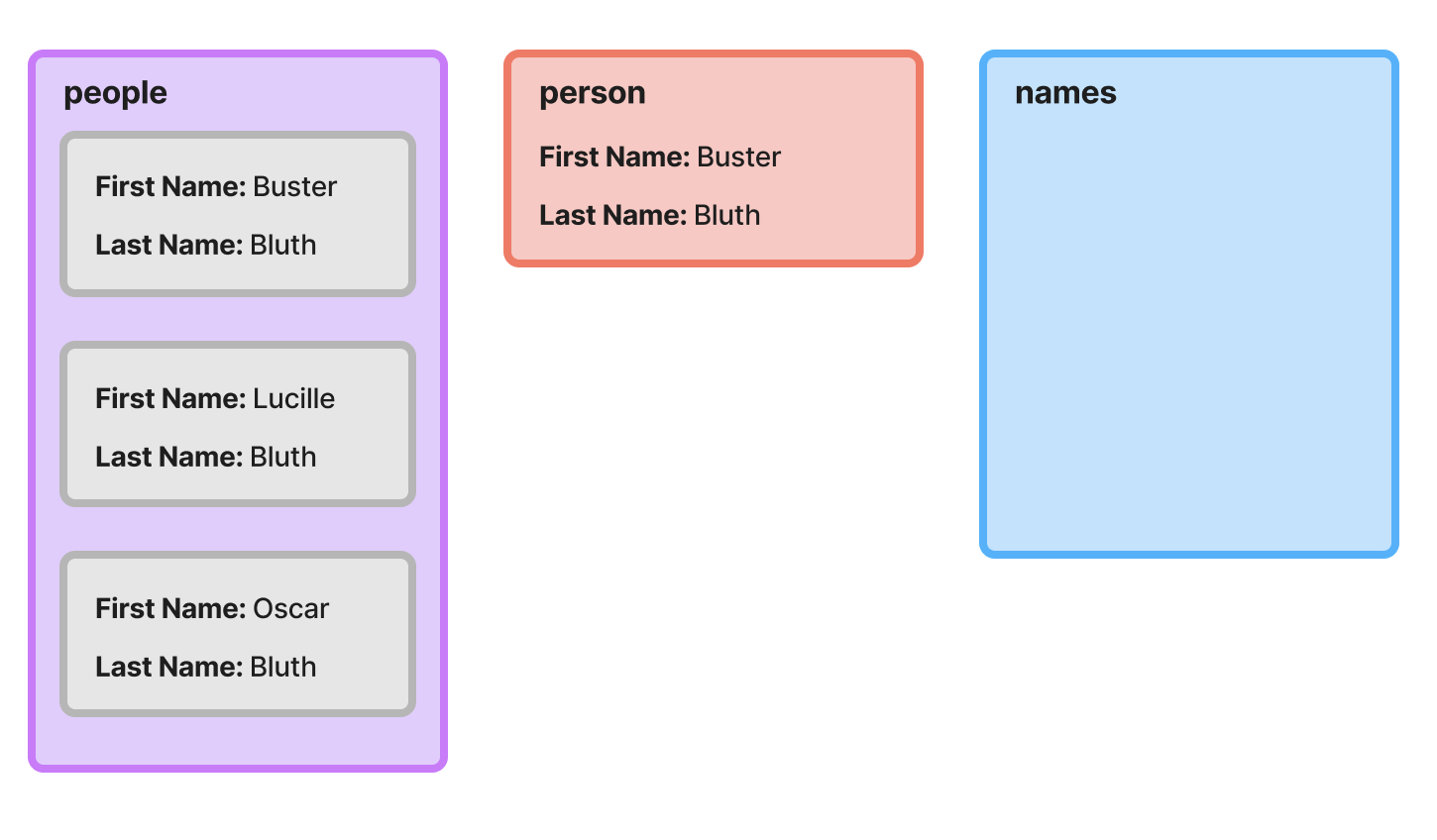
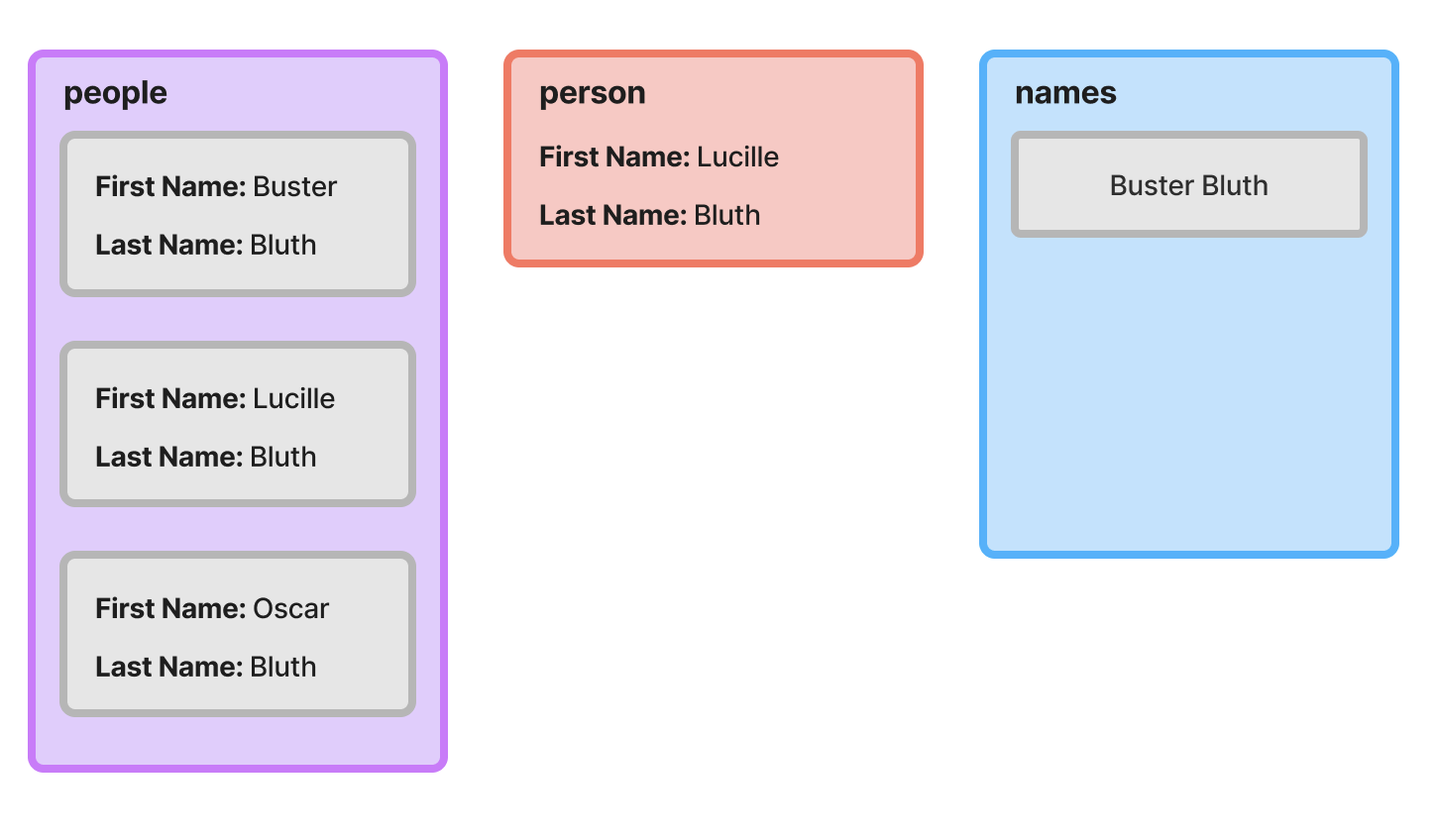
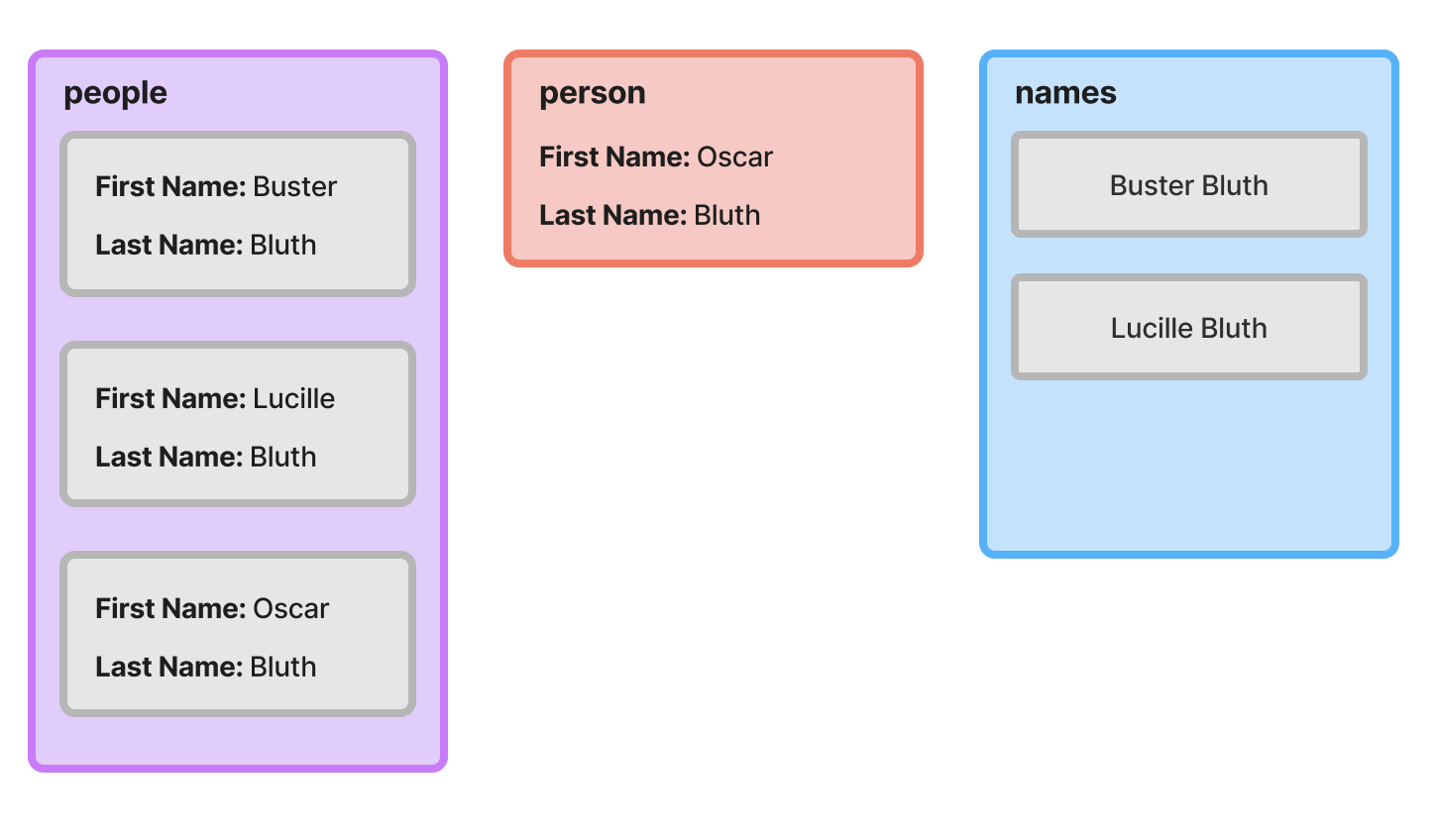
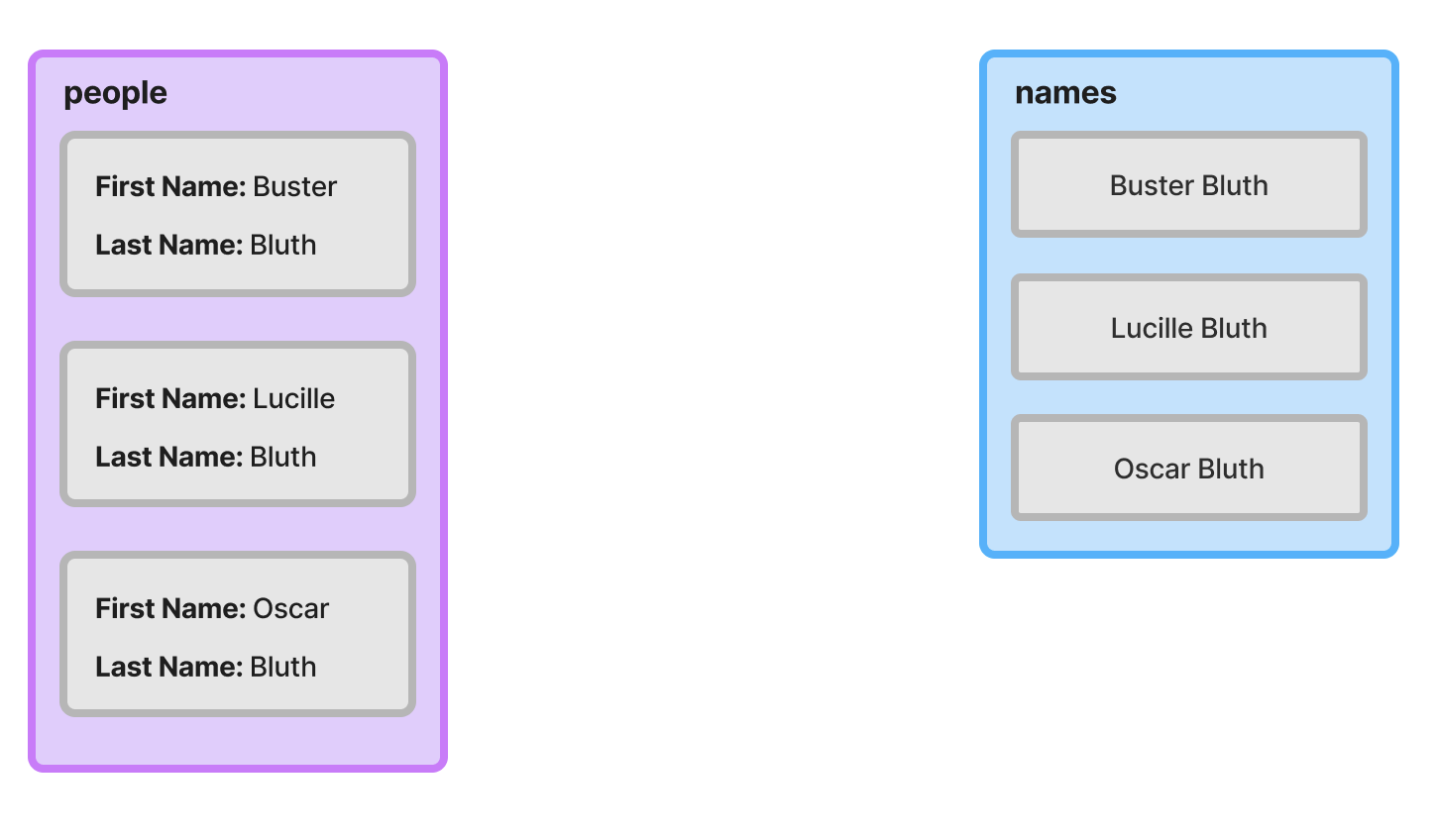
To gain a deeper intuition for how reduce works, it can be helpful to walk through the example step-by-step and visualize the current state at each iteration.
First Iteration
On the first iteration, our accumulator, names, is an empty array. The first object from the people array is assigned to the person variable and appended to the end of a new array that’s initialized with the current items in the accumulator (at this point nothing). That new array is returned from the function and will be used as the updated accumulator input to the next iteration.
Second Iteration
After the first iteration completes, the names accumulator has a single string value. In the second iteration, the second object from the people array is assigned to the person variable. It’s then appended to a copy of the current accumulator, and that new array is returned and used as the accumulator on the final iteration.
Final Iteration
Hopefully you’re catching on to the pattern at this point. We perform the same operation as the previous iterations; the only thing that changes is the current accumulator value and the current object being processed.
End State
Once the reduce operation completes, the names array has three string values.
Where reduce Excels
At this point, all we’ve done is recreate map, which isn’t terribly exciting. Let’s consider a more interesting example. Suppose we have the following array of objects:
[
  { "id": "1", "name": "Google", "location": "Mountain View, CA" },
  { "id": "2", "name": "Anthropic", "location": "San Francisco, CA" },
  { "id": "3", "name": "Meta", "location": "Menlo Park, CA" }
]
If we want to get the details for a company given an id, we need to use find or filter, like so:
const anthropic = companies.find((company) => company.id === "1");This definitely works, but it’s not ideal. Suppose our list of companies was much larger and we had to get the details for more than just one. At a larger scale, this is extremely inefficient; if the desired company is at the end of the list, the find operation will need to check each and every element in the list before it finds what it’s looking for.
In computer science terminology, the asymptotic complexity of the find operation on an unsorted array is linear, meaning that the average amount of time it takes to find an item is directly proportional to the size of the array.
If the data were formatted as an object keyed by ID instead, lookups wouldn’t require scanning the entire dataset. The asymptotic complexity is much better; in this case, it’s constant, meaning that it is the same regardless of the size of the object.
const companies = {
  "1": { name: "Google", location: "California", revenue: 100 },
  "2": { name: "Anthropic", location: "California", revenue: 300 },
  "3": { name: "Meta", location: "California", revenue: 200 },
  "4": { name: "Amazon", location: "Washington", revenue: 150 },
};

// Much more efficient => O(1)
const anthropic = companies["1"];
We often don’t control the source format of the data we’re working with. For example, we may have received the company array from an external API. Fortunately, we can easily convert the data to a more workable format using reduce. Here’s what that would look like.
type Company = { id: string; name: string; location: string; revenue: number };

const companyLookup = companies.reduce<Record<string, Company>>((acc, cur) => {
  return { ...acc, [cur.id]: cur };
}, {});
Here, we’re creating an object keyed by company ID from the original list of companies. To do so, we set the initializer to an empty object of type Record<string, company>, and provide a reducer function that adds a new entry into the accumulator object for each company in the array.
Properly Typing Reduce
In TypeScript, there are a few different ways to properly type reduce. Matt Pocock does an excellent job enumerating the available options in this blog post.
My preference is to provide the type of the accumulator to the generic type argument position.
A More Advanced Example
While working through the example in the previous section, you might have caught on to the fact that there’s quite a bit more we could have done to affect the final output of the operation.
For instance, consider the following example:
const californiaCompanies = companies
  .filter((company) => company.location === "California");
  .map((company) => `${company.name}: $${company.revenue}`)
Here, we’re filtering our list of companies before applying the map operation. We can easily accomplish this using a single call to reduce.
const californiaCompanies = companies.reduce((accumulator, company) => {
  if (company.location === "California") {
    return [...accumulator, `${company.name}: $${company.revenue}`];
  }
  return accumulator;
}, []);
In this particular case, I generally prefer chaining the filter and map calls as demonstrated in the first code snippet, but hopefully this illustrates some of the extra the flexibility we gain with reduce.
There is one scenario where I would opt for the reduce variant of this example, though, but it only applies if you’re using TypeScript (which you should be 😉).
Consider the following example:
type Company = {
  id?: string;
  name?: string;
  location?: string;
  revenue?: number
};

function formatCompany(companyName: string, revenue: number) {
  return `${companyName}: $${revenue}`;
}

const companies: Company[] = ... // declaration omitted for brevity

const formattedCompanies = companies
  .filter((company) => !!company.name && !!company.revenue)
  .map((company) => formatCompany(company.name, company.revenue));
Here, we’re working with a modified version of the Company type where all properties are optional.
This might look fine at first glance, but there’s actually an error on the last line. If you copy this into your editor, you’ll see that TypeScript is complaining that we’re passing an argument of type string | undefined into formatCompany, but it only accepts an argument of type string.
Didn’t we filter out objects that don’t have a company name and revenue? We sure did, but TypeScript isn’t smart enough to infer that. If you remove the map call from the example above and inspect the type of the filter output, you’d see that it’s still a Company[].
How can we fix this? One option would be to create a new type.
type NonNullCompany = Required<Company>;

const names: NonNullCompany[] = companies
  .filter(
    (company): company is NonNullCompany => !!company.name && !!company.revenue
  )
  .map((company) => formatCompany(company.name, company.revenue));
Here, we’ve declared a new type, NonNullCompany, which is a variant of Company where all properties are required. We then pass a slightly modified callback to the filter function whose return type is a type predicate.
This works, but creating a new type isn’t ideal. Fortunately, we can solve this using reduce.
const formattedCompanies = companies.reduce((names, company) => {
  if (!!company.name && !!company.revenue) {
    const formattedCompany = formatCompany(company.name, company.revenue);
    return [...names, formattedCompany];
  }
  return names;
}, [] as string[]);
In the body of the reducer function, we can leverage truthiness narrowing to ensure that formatCompany is only called with defined values. If either name or revenue are undefined, the company will be excluded from the final array.
When Should reduce be Used?
This post provided a few contrived examples to illustrate the functionality of reduce for educational purposes, but you might be wondering when it should actually be used. It’s worth noting that there’s no problem that can only be solved with reduce. For example, the final example in the previous section could be written as follows:
const formattedCompanies: string[] = [];

for (const company of companies) {
  if (company.name && company.revenue) {
    formattedCompanies.push(formatCompany(company.name, company.revenue));
  }
}
The critical difference between these two versions is that the latter relies on mutating state (the formattedCompanies array), whereas the version using reduce operates on immutable data. This post isn’t focused on the benefits of immutability, so I’ll defer to a Stack Overflow answer that provides a concise justification for prefering immutability:
Basically it comes down to the fact that immutability increases predictability, performance (indirectly) and allows for mutation tracking.
It’s worth reading the full linked answer, as well as a contrarian view.