Introduction
Web application security is a topic that many engineers largely neglect, but is obviously of critical importance. Sure, the basics are usually covered (don’t store plaintext passwords, sanitize inputs to avoid SQL injection), but it’s often difficult to feel confident that your app is secure and that you’re following best practices.
As one of those engineers who neglected this important domain, I recently decided to take it more seriously. As a starting point, I read Grokking Web Application Security, an excellent introduction to web security and best practices. In this post, I’ll go through what I think are some of the most important pieces of advice I picked up from the book that can be easily applied to your web applications.
This is the first in a series of posts where I’ll cover some practical tips for securing your web application.
Securing Your Cookies
Cookies can be used in a myriad of ways when it comes to web application security. Most commonly, they’re used to store session identifiers. Here’s how the flow typically works (some details omitted for brevity).
- A user provides their username and password to a login form and clicks “Login”.
- The username and password are sent in an HTTP request to the server where they’re validated.
- If the username exists and the password matches the stored password for the user, the login is successful and a session ID is generated.
- The session ID is stored in a database and associated with the user.
- The server sends the session ID back to the user, typically in a cookie.
The logged in user now has a session ID stored in their browser that’s included in any subsequent HTTP request to the server, and the server will validate that the provided session ID is valid.
By default, cookies are accessible to JavaScript code running in the browser. In isolation this isn’t an issue; however, web applications don’t exist in pristine, isolated environments. They exist in a chaotic landscape where malicious actors will do everything in their power to exploit vulnerabilities. One common vulnerability you may have heard of is cross-site-scripting (or XSS).
XSS Explained
XSS attacks occur when someone (likely a hacker) is able to run their JavaScript code on your website. There are a few ways this is possible, but a common one is through what’s referred to as stored XSS. Let’s walk through a real-world example.
Suppose we have a web application that allows users to log in and post comments to a forum (among other things). Following the aforementioned login flow, when a user logs in, the request payload includes the username and password. The server will validate the credentials and generate a session token, which is stored in a cookie.
You can see an example of this in the recording below; cookies for a page are accessible in the Application tab of the Chrome dev tools.
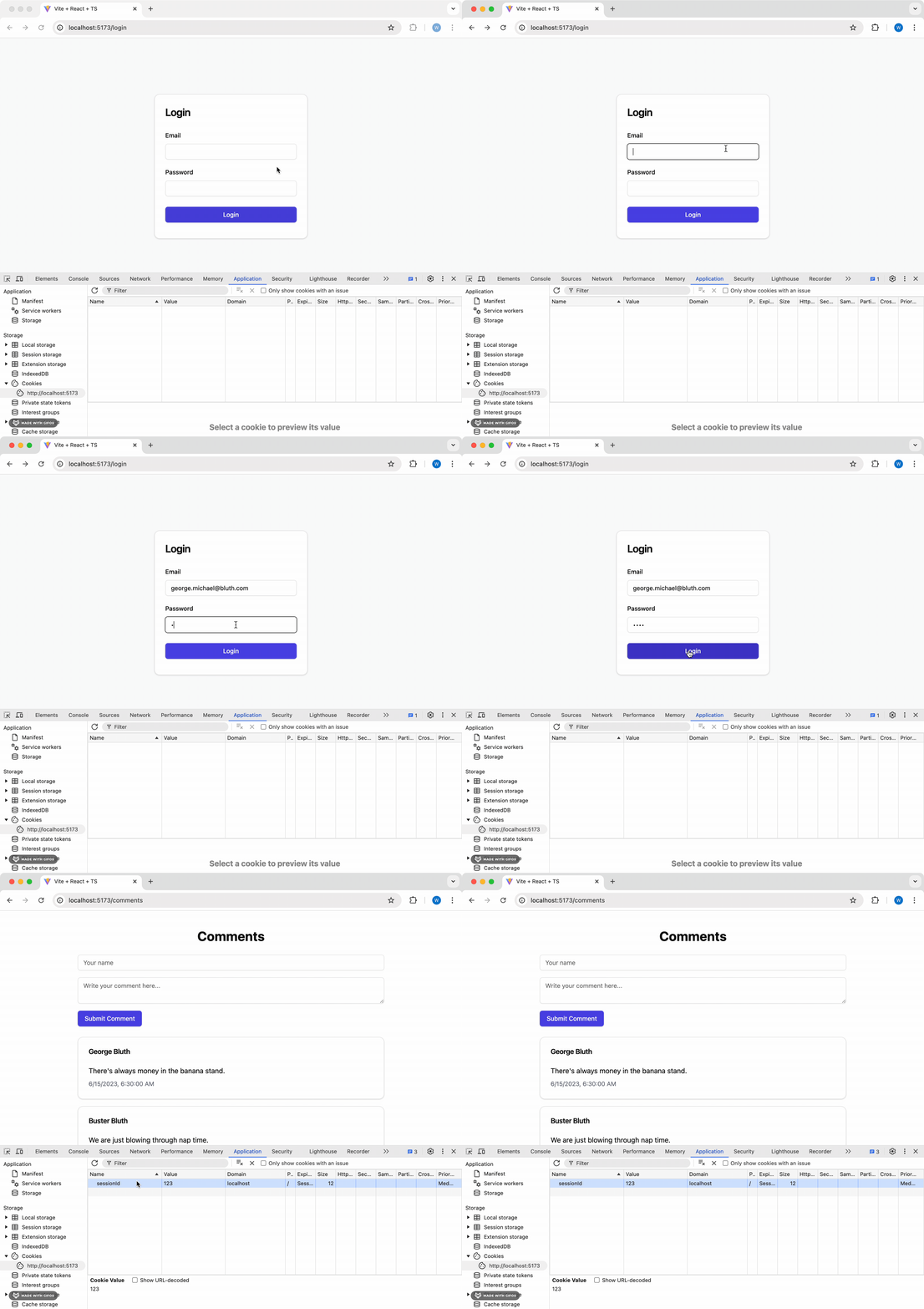
The session token will be included with every HTTP request to the server, where it can validate that a request is authenticated by validating the session token before processing the request (this involves a database lookup to ensure that the provided token is the same as the one stored for the user). If leaked, the session token can be used to impersonate the user until the session expires. Let’s walk through an example of this exploit in action.
Since the comments section of the application allows user input, a malicious user could post a comment that includes JavaScript code. If the application doesn’t properly sanitize the input, the JavaScript code will be executed in the browser of any user who views the comment. Reading cookies with JavaScript is trivially easy, so the malicious user can retrieve the session token and use it to impersonate the user.
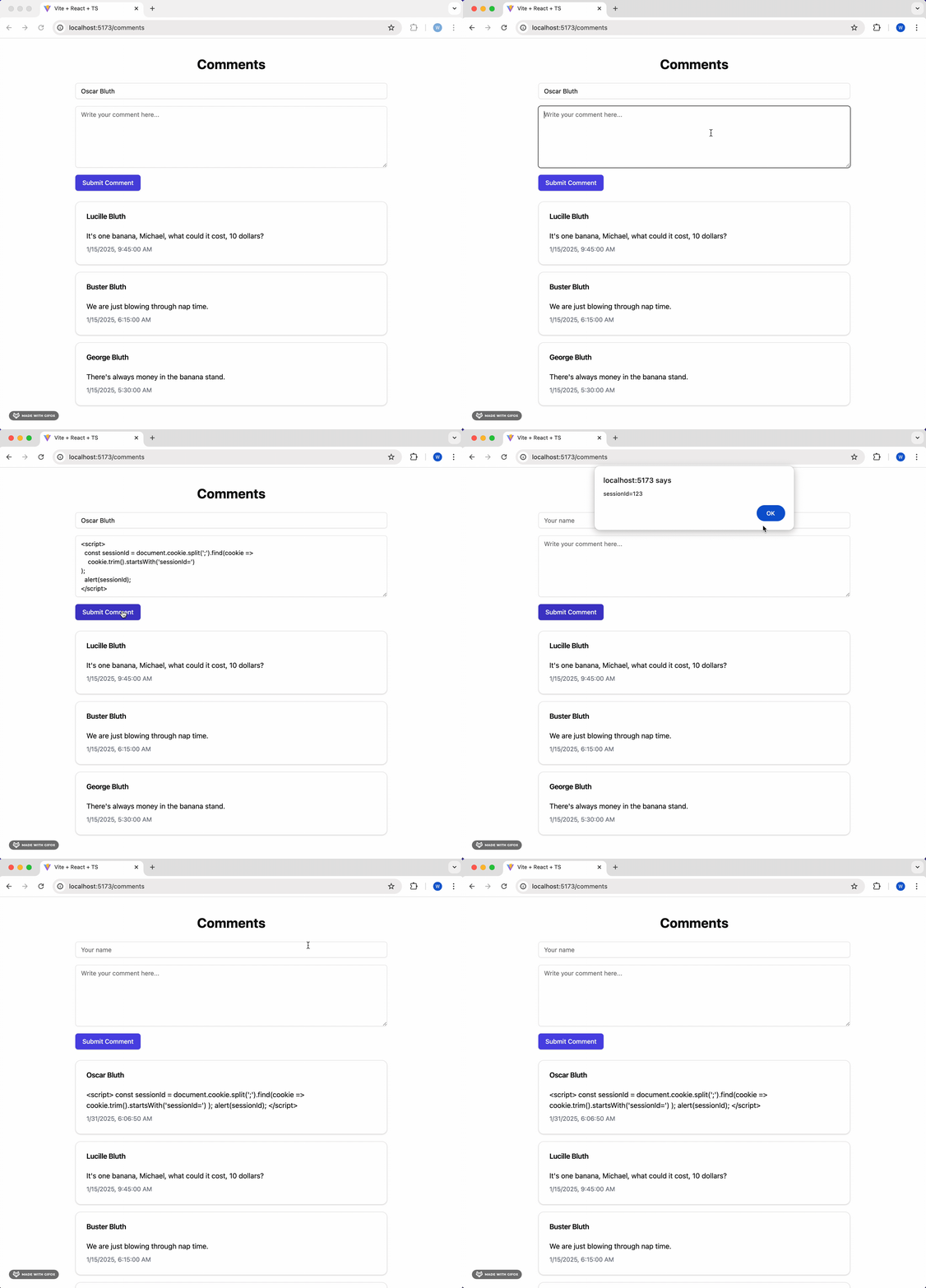
Here, the malicious user has added the following script to a comment:
<script>
  const sessionId = document.cookie
    .split(";")
    .find((cookie) => cookie.trim().startsWith("sessionId="));
  alert(sessionId);
</script>
This retrieves the session ID from the cookie and alerts it to the user. In a real-world scenario, the hacker obviously wouldn’t include the alert line; rather, they would send the token to a server they control using an HTTP request.
Executing Arbitrary Code in React
It's actually quite difficult to execute arbitrary code in a <script>
tag in React, which is a good thing! This means that by default, you can safely render untrusted input in a <script> tag without worrying about XSS attacks. If you're interested in how we're doing it in this example, see the end of this post.
HTTP-Only Cookies
So how can we prevent this kind of attack? The answer is to use HTTP-only cookies. These cookies are marked with the HttpOnly flag, which tells the browser to prevent JavaScript code from accessing the cookie.
The way to do this will depend on the server framework you’re using, but here’s an example of how it’s done in Hono:
import { setCookie } from "hono/cookie";

setCookie(c, "sessionId", sessionId, { httpOnly: true });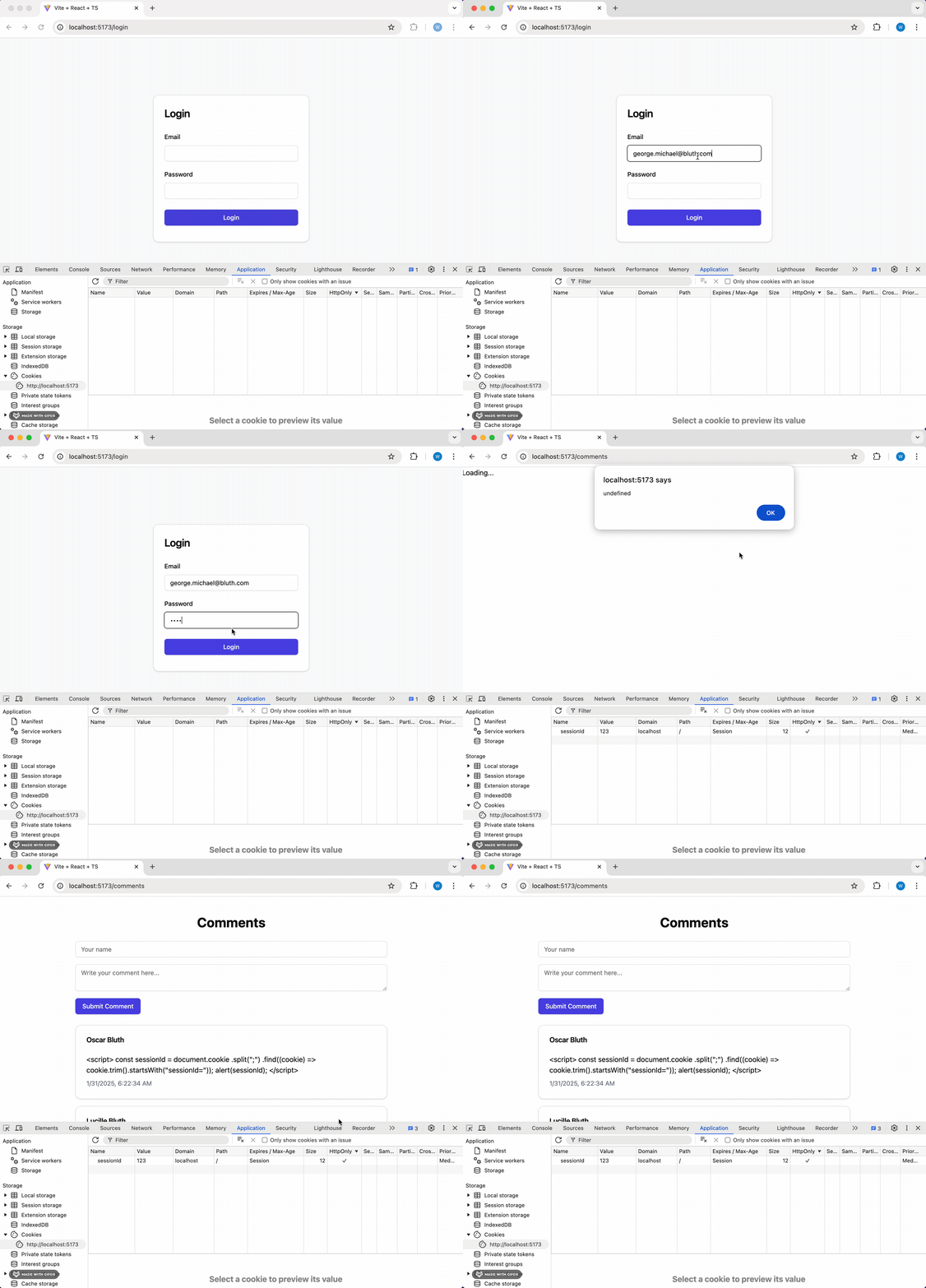
This one-line change adds a necessary layer of protection to your web applications, mitigating the risk of attacks and helping to keep your users secure.
Appendix: Executing Arbitrary Code in React
Up until React 19, it was pretty difficult to execute arbitrary code in a <script> tag. For instance, the following will not work in older versions of React.
const ScriptComponent = () => {
  return (
    <div>
      <script>alert("Hello, world!")</script>
    </div>
  );
};
React 19 changes this with the introduction of the <script> component. Details can be found in the documentation.
But if you’re simply trying to render user-generated content (like comments), it’s extremely unlikely that you’d include a <script> tag in your code. More likely, you’d have something like this:
const UserComment = ({ comment }: { comment: string }) => {
  return <div>{comment}</div>;
};
If the comment prop contains a script, it will not be executed. Let’s see what it looks like in the DOM.
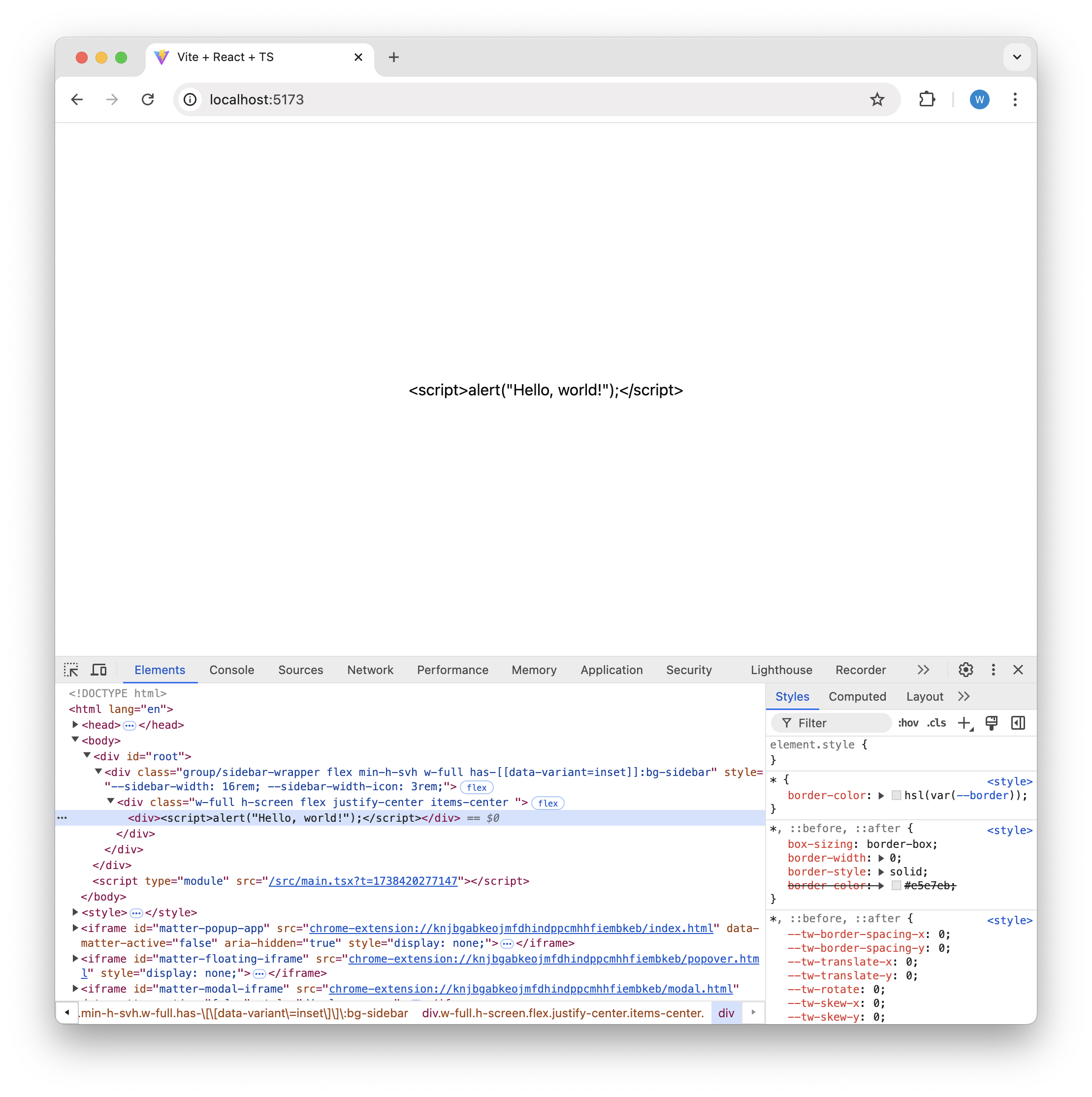
As you can see, no actual script element was added; rather, the script was added as the text content to the div. This is exactly the behavior we want. With no additional work on our end, we don’t have to worry about users injecting arbitrary JavaScript onto the page.
But what if, for some reason (perhaps for educational purposes like this post) we’d like to enable users to inject JavaScript onto the page. If you know React fairly well, your first thought might be to use dangerouselySetInnerHTML, like this:
const ScriptComponent = () => {
  const codeToExecute = '<script>alert("Hello, world!");</script>';

  return <div dangerouslySetInnerHTML={{ __html: codeToExecute }} />;
};
This works, but only in React 19, which includes support for the <script> component. If you’re using an older version of React, this will not work.
In order to get this working in older versions of React, you’ll need to do something like this:
const ScriptComponent = ({ scriptContent }: { scriptContent: string }) => {
  const containerRef = useRef<HTMLDivElement>(null);

  useEffect(() => {
    if (containerRef.current) {
      const script = document.createElement("script");
      script.text = scriptContent
        .replace("<script>", "")
        .replace("</script>", "");
      containerRef.current.appendChild(script);
    }

    return () => {
      if (containerRef.current) {
        containerRef.current.innerHTML = "";
      }
    };
  }, [scriptContent]);

  return <div ref={containerRef} />;
};
ScriptComponent accepts a string containing JavaScript within a <script> element. It then creates a new <script> element and adds the scriptContent prop as the script body, replacing the <script> opening and closing tags from the input string. Finally, it appends the script as a child to the rendered div.
Fortunately (or unfortunately), executing arbitrary JavaScript within a script element is much simpler in React 19. The caveat is that there are more opportunities for XSS attacks, so engineers will need to ensure that the code they write is secure from such attacks.