CSRF Fundamentals
CSRF attacks are based on a few fundamental principals of how the web functions.
The first principal underlying CSRF is that web servers will, generally speaking, accept requests from anywhere. Now there are of course caveats to this; for instance, a firewall protecting a web server can block requests based on certain characteristics. Put more precisely, anyone can make a request to a web server, but the web server doesn’t have to process all requests.
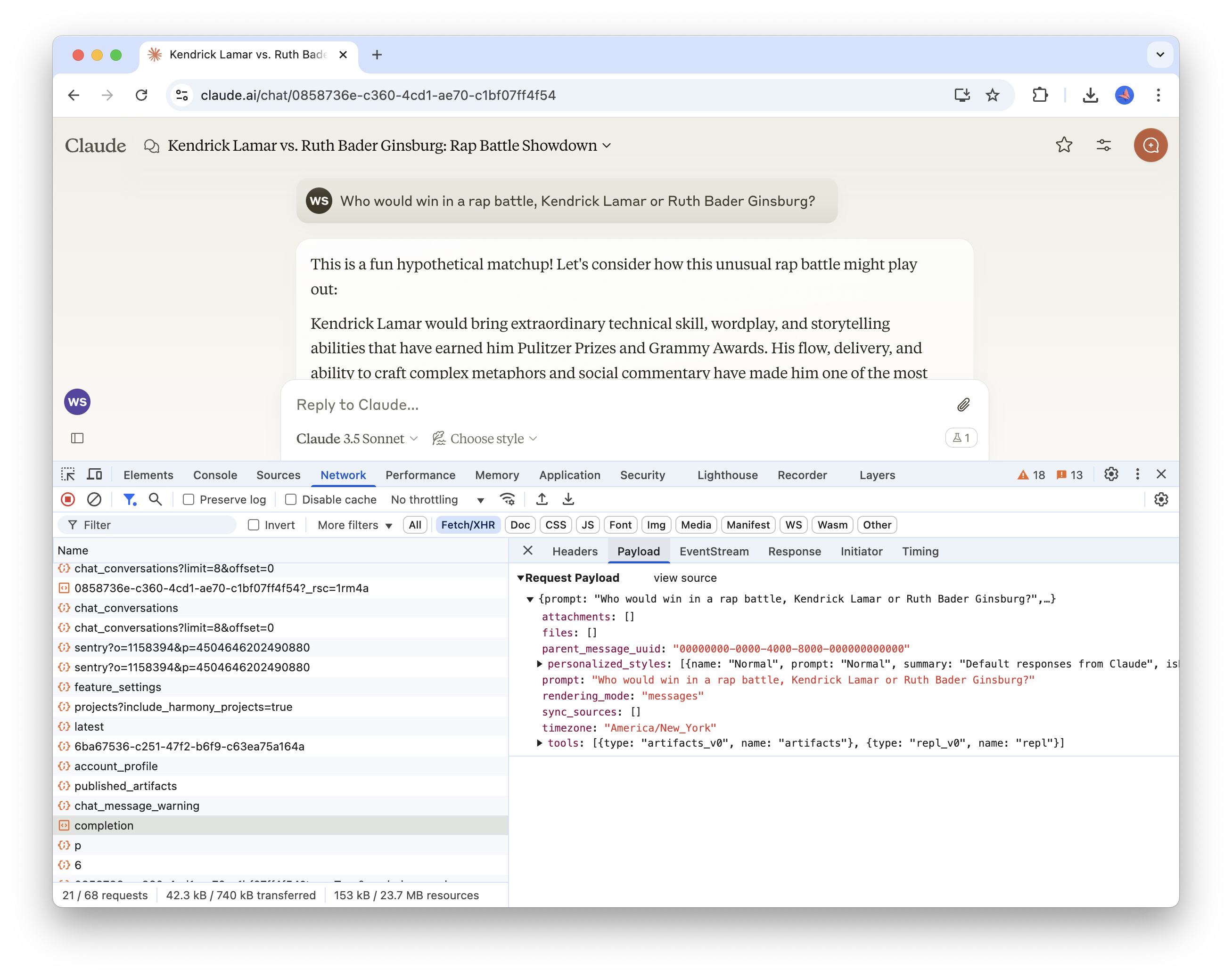
The second principal is that client-side requests to web servers are transparent; you can easily inspect the requests being made from the client to a server using the browser developer tools. For example, the screenshot below shows a POST request made to an Anthropic backend server to process a chat completion request. As you can see, we have access to the full payload sent with the request.
Finally, any HTTP request made to a site, even if it originates from a different site, will include the cookies for the requested site. For instance; if I’m logged into GitHub (i.e. my browser has a valid session cookie for GitHub) and I make an HTTP request to GitHub from a different site, that request will include the GitHub session cookie.
Based on these principals, let’s define what CSRF actually is. CSRF, or cross-site request forgery, is an attack where a user is deceived into performing an action they did not intend. That’s a fairly abstract definition, so let’s walk through an example to make it a bit more clear.
CSRF in Practice
Suppose that you have an account on a social media service that, like all good web services, allows users to delete their account. Let’s also suppose that engineer responsible for implementing the account deletion endpoint didn’t have a strong grasp on which HTTP verbs should be used for actions that mutate state (i.e. POST vs GET). This well-intentioned but unsupervised engineer created the account deletion API using a GET endpoint that could be invoked as follows:
curl http://social.co/api/account/deleteThe endpoint requires the requesting user to be authenticated - how else would it determine which user to delete? You might be wondering why the endpoint wouldn’t just accept a parameter for the ID of the user to delete. That would definitely be a step in the right direction, but I’ve omitted it solely for the purposes of simplifying this illustration.
Being a social network, the application has a way for users to create posts with arbitrary content (text, links, photos, etc.). An attacker can easily create a compelling but deceptive post that users will be inclined to click.
The attacker has disguised the actual link, https://social.co/api/account/delete, with a link that appears to be innocent. When the user clicks on the link, instead of visiting what they think is a harmless site, they’ll inadvertently delete their account.
This same pattern could be applied to any publicly exposed API endpoint that doesn’t require any dynamic parameters (such as a user ID), which is why it’s absolutely critical to ensure that state cannot be mutated by a GET request.
Cross-Site Requests
In the previous example, the attack was isolated to our single social media web application; the attacker took advantage of a poorly-designed API to execute their attack within the scope of a single site. But as implied by the name cross-site request forgery, these attacks can be used to target a different site than the one the user is actively using.
Let’s demonstrate this with a practical example. Suppose there are two web applications; a money transfer app (like Venmo) and a social media site. In this example, the money transfer app has a CSRF vulnerability because the endpoint used to transfer money from one account to another is implemented using a GET.
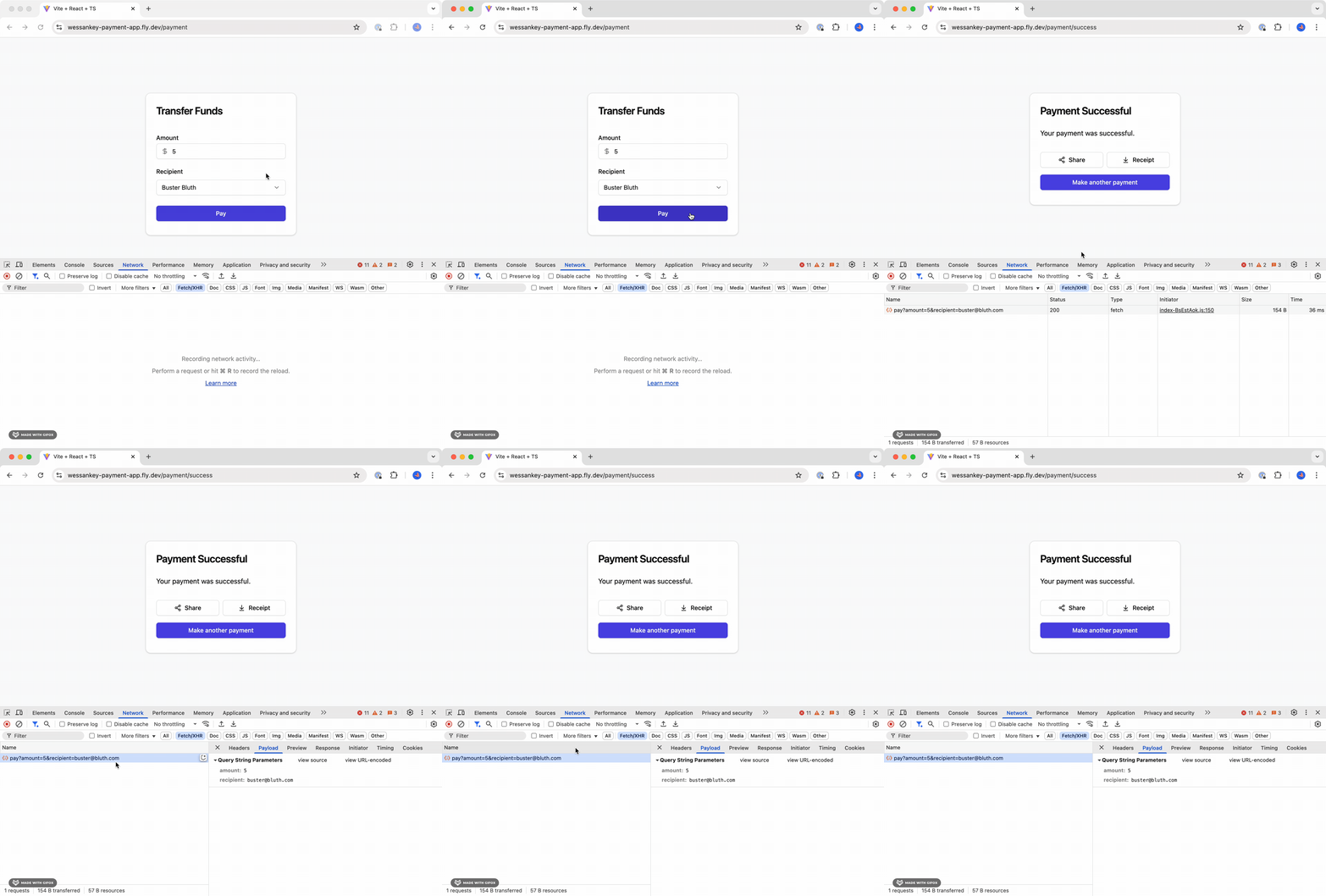
As you can see from the screen recording above, a GET request to the following URL is invoked when the user makes a transfer.
https://wessankey-payment-service.fly.dev/api/pay?amount=5&recipient=oscar@bluth.comThe endpoint does require the requesting user to be authenticated, so attempting to abuse it using an API client (i.e. cURL or Postman) won’t work. This alone doesn’t provide enough protection, though. All that’s required is a bit of social engineering to manipulate an already authenticated user into clicking a link that’s constructed to transfer funds from the user into the attackers account.
One way this could be achieved is by posting the link on a social networking site, like in the previous example. Below, we have a basic social networking application that allows users to post messages to a public feed. The link in the most recent message attempts to deceive other users into a lifetime supply of free Bluth Bananas (an offer no sane person could refuse), but a closer look at the link source reveals malicious intent. Masquerading as this unbelievable offer is a link to the payment app that will transfer $5.00 to the attackers account.
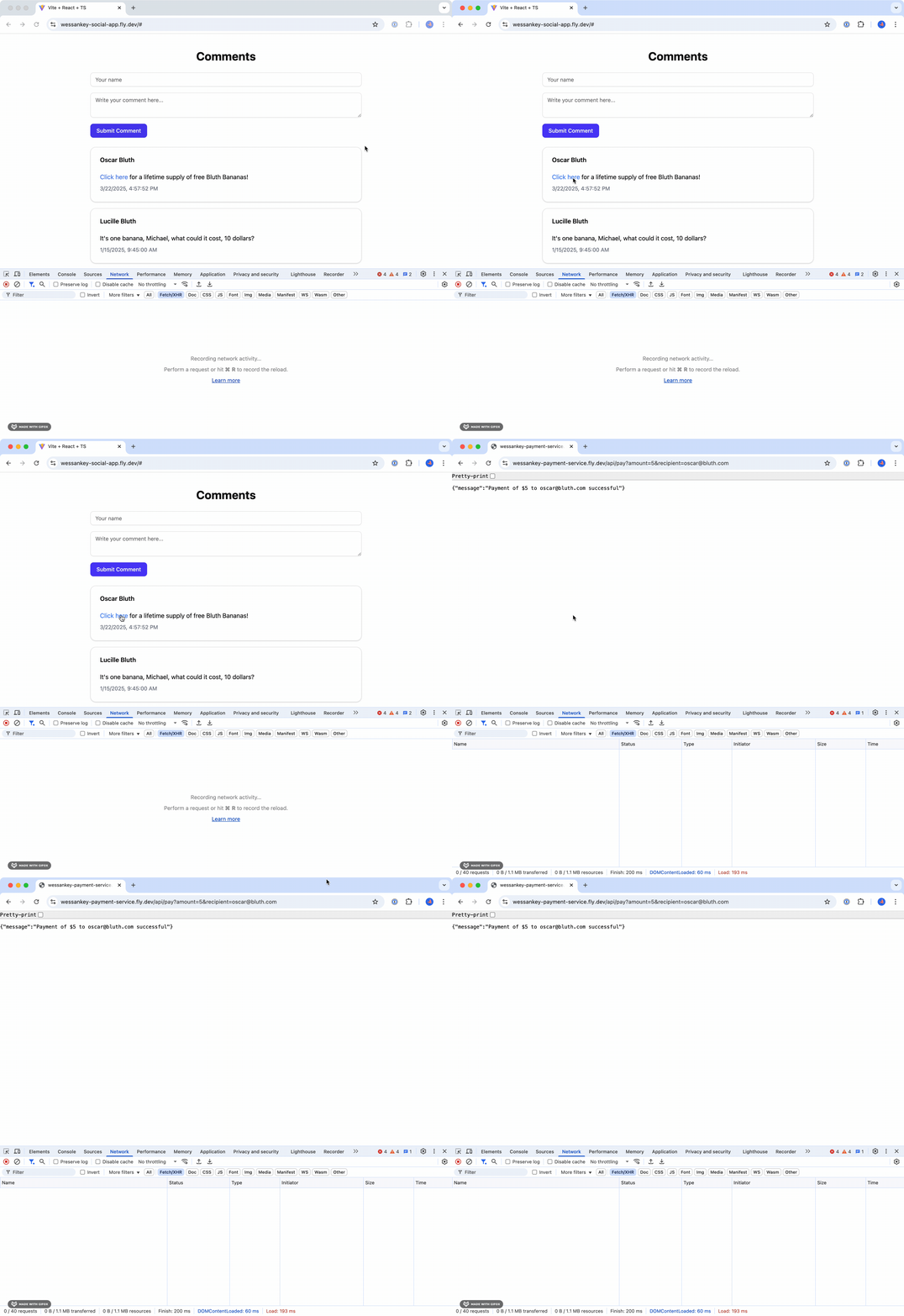
Successful execution of an attack like this has two critical requirements:
- The user has an account on the target site.
- The user is authenticated to the target site.
Here’s a breakdown of how this particular example works.
- A user logs into the payment app, which stores a session token as a cookie in the user’s browser to be used for authenticating requests. This is a common pattern used by most web applications.
- The user visits the social networking site and clicks on the malicious link.
- As mentioned in the fundamentals section at the beginning of this post, all requests to a site (even if the request originates from a different site) will include the requested sites cookies.
Even if the endpoint was correctly implemented as a POST instead of a GET, there are still opportunities for exploitation. Namely, more sophisticated CSRF attacks can be executed when combined with cross-site scripting, which we’ll walk through in the next section.
Executing Arbitrary Code in React
In this example, we're relying vulnerabilities across multiple sites. An alternative approach an attacker could take would be to create their own legitimate looking site that executes requests (GET and/or POST) to target sites (like the payment site). All the attacker needs to do is to get users onto their site, which could be done in a variety of ways.
Using XSS to Execute a CSRF Attack
If you aren’t familiar with cross-site scripting (XSS), check out the first post in this series.
Let’s suppose that our sample social media application conducted an audit of its API endpoints and corrected its mistakes; GET requests are no longer used for actions that mutate state (i.e. account deletion). This prevents the attack described in the previous section, but we’re not out of the clear quite yet.
Our application allows users to create posts, accepting arbitrary text and rendering it for other users to see. There’s a problem with our post implementation, though. It doesn’t properly sanitize its inputs and it allows users to add arbitrary JavaScript that will be executed every time the post is rendered. This adds a serious security vulnerability to our site that attackers can take advantage of using cross-site scripting.
With that attack vector exposed, malicious actors can combine cross-site scripting (XSS) with CSRF to amplify the severity of their attacks. For example, they could add the following payload to a post:
<a
  href="#"
  onclick="javascript:
  fetch('https://wessankey-payment-service.fly.dev/api/pay', {
    method: 'POST',
    body: JSON.stringify({amount: 5, recipient: 'oscar@bluth.com'}),
    headers: {'Content-Type': 'application/json'},
    credentials: 'include'
  });"
  >Click here</a
>
for a lifetime supply of free Bluth Bananas!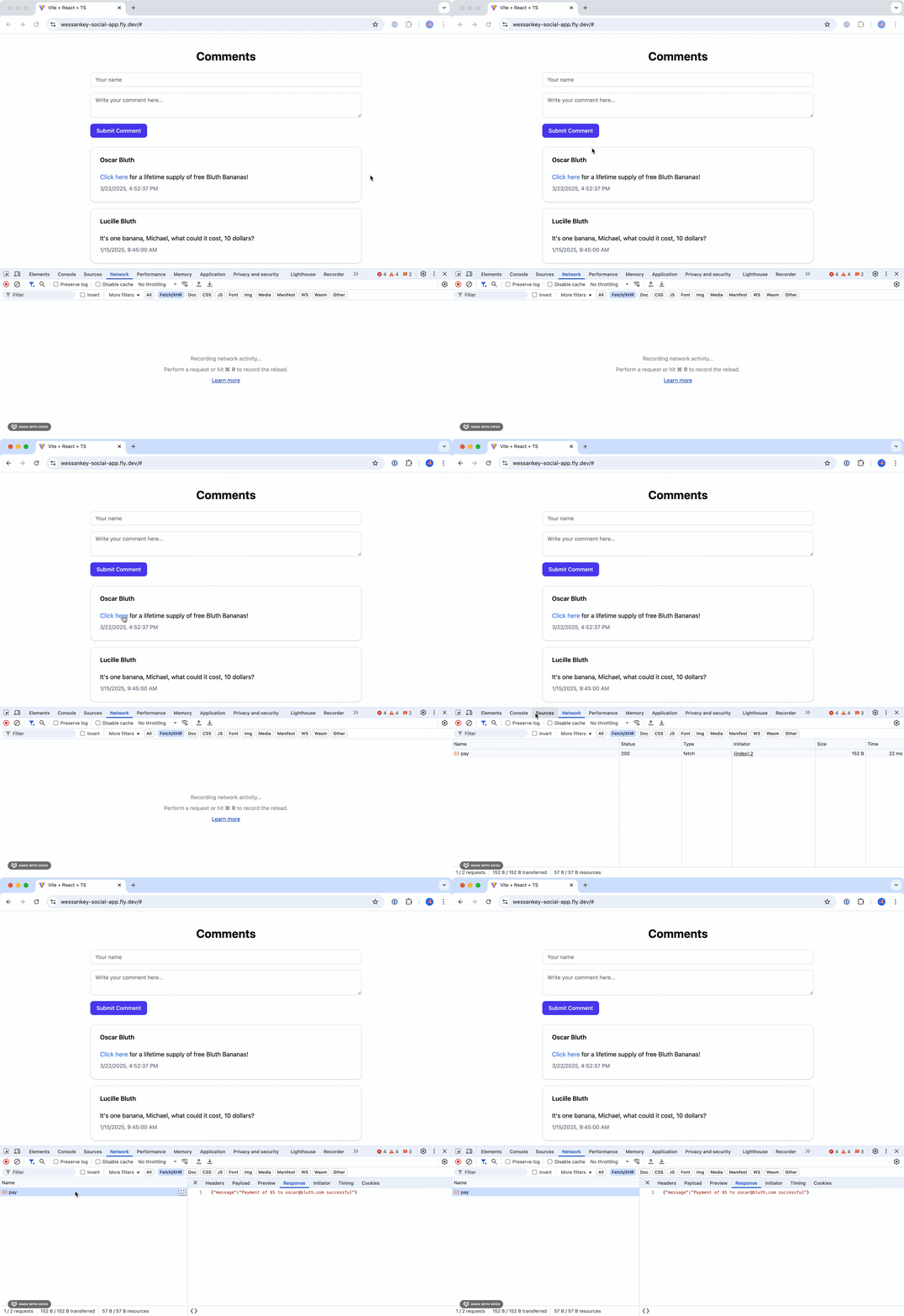
What’s particular insidious about this method is that most normal users won’t have their network tab open, so clicking the link will appear to take no action.
Preventing CSRF Attacks
Fortunately, there are several simple ways to mitigate the risk of CSRF attacks. In building the examples used in this post, it actually took more effort to make the sites vulnerable to the attacks; the default settings provided sufficient prevention mechanisms.
Prevention Strategy 1: SameSite Cookies
Cookies can be configured with the SameSite attribute, which determines when the cookie will be sent when making requests. This attribute can take on one of three values. I’ll defer to this article for a more detailed breakdown of what each of those properties do, but at a high level:
| Value | Description |
|---|---|
None | Cookie will always be sent |
Lax | Cookie will only be sent in requests originating from the same site and in top-level navigations with “safe” HTTP methods (i.e. GET) |
Strict | Cookie will only be sent in requests originating from the same site that set the cookie (no cross-site requests) |
For some degree of protection, you’ll want to use either Lax or Strict. The benefit of using Lax is that you won’t need to log in every time you visit the site from an external link. This is practical for applications that require slightly less security, such as Netflix, where the surface area and potential consequences for attacks is considerably less than something like a banking application.
Unfortunately, you’ll need to use None if your client and server are hosted on different sites.
Site vs Domain
It's crucial to understand the difference between a site and a domain when working with cookies. A domain is the full hostname of a URL, which includes the subdomains, whereas the site is the effective top-level domain (TLD) plus one level For example; the domain of https://www.blog.westonsankey.com is blog.westonsankey.com, and the site is westonsankey.com.dev.
A request between client.westonsankey.com and server.westonsankey.com would be considered a same-site request. Given this, you might be wondering if apps deployed to services such as Vercel, which provide a default site of .vercel.app, would be susceptible to large-scale CSRF vulnerabilities. After all, wouldn't that mean that a request from my-app.vercel.app to your-app.vercel.app be considered a same-site request?
Prevention Strategy 2: CORS
CORS, or cross-origin resource sharing, is a mechanism used by servers to specify the origins from which it will allow resource requests. A comprehensive explanation of CORS and all of its intricacies is well beyond the scope of this post, but I’ll cover the key points that are relevant to CSRF mitigation.
With respect to CSRF, CORS can help prevent (but not entirely mitigate) unwanted cross-site requests. CORS is configured on the server, and the configuration details will depend on the framework being used. The following example shows how it can be configured on a Hono server.
import { cors } from "hono/cors";

app.use(
  "/api/*",
  cors({ origin: ["https://example.com", "https://example.org"] })
);
In this example, we’re specifying that requests from https://example.com and https://example.org are allowed to access server resources.
This helps mitigate CSRF attacks by explicitly whitelisting the origins from which requests should be permitted to access resources. This means that any origin other than what you’ve explicitly permitted will be unable to execute requests against your server, whether that site is created by an attacker or the code is maliciously injected into a different site.
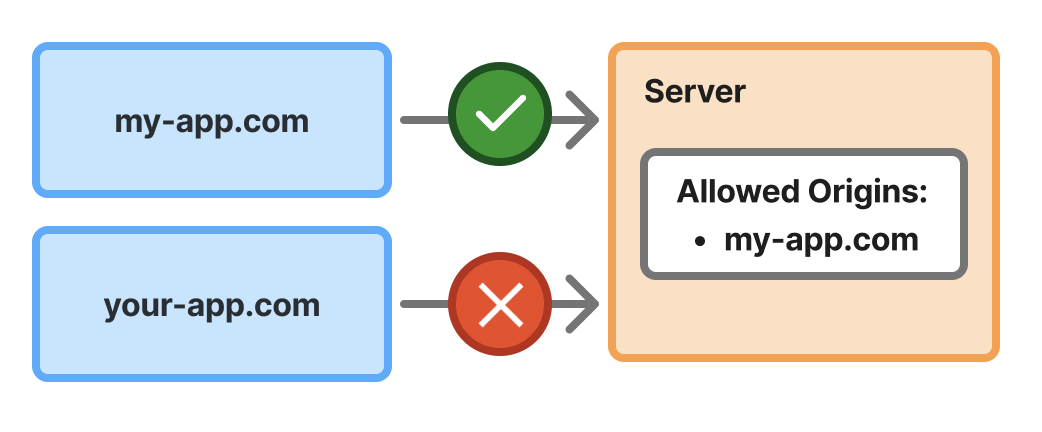
It’s important to understand the CORS does not apply to every type of request. Most notably, traditional HTML form submissions are not restricted by CORS; only requests that originate from JavaScript are subject to CORS restrictions. Consequently, you should not rely exclusively on CORS to fully mitigate CSRF risks.
Prevention Strategy 3: Anti-CSRF Token
Arguably the best way to prevent CSRF attacks is to implement an anti-CSRF token. This is a random value generated on the server per session (or even per request) that is sent to the client and stored in the client application state. The client will include the token in subsequent requests to the server, and the server will validate that it’s the expected value. This pattern is also referred to as the synchronizer token pattern by OWASP.
Implementing a per-session anti-CSRF token could work as follows:
- When a login request is sent to the server, generate a random value to be used as the anti-CSRF token. Store the token in the database alongside the session and include it in the response back to the client.
- The client will store the token in application state (i.e. React context) and will include it in subsequent requests.
- When the server receives a request that attempts to mutate state in some way, verify that the request includes the anti-CSRF token and that it matches the token stored with the session in the database.
These three strategies are certainly not the only ways to prevent CSRF attacks, but they’re three of the most common and simplest to implement. Check out the resources in the following section for details on additional mitigation strategies.